HAB flight 8 – a real adventure – GPSL at Pella, Iowa

This one was a real adventure!

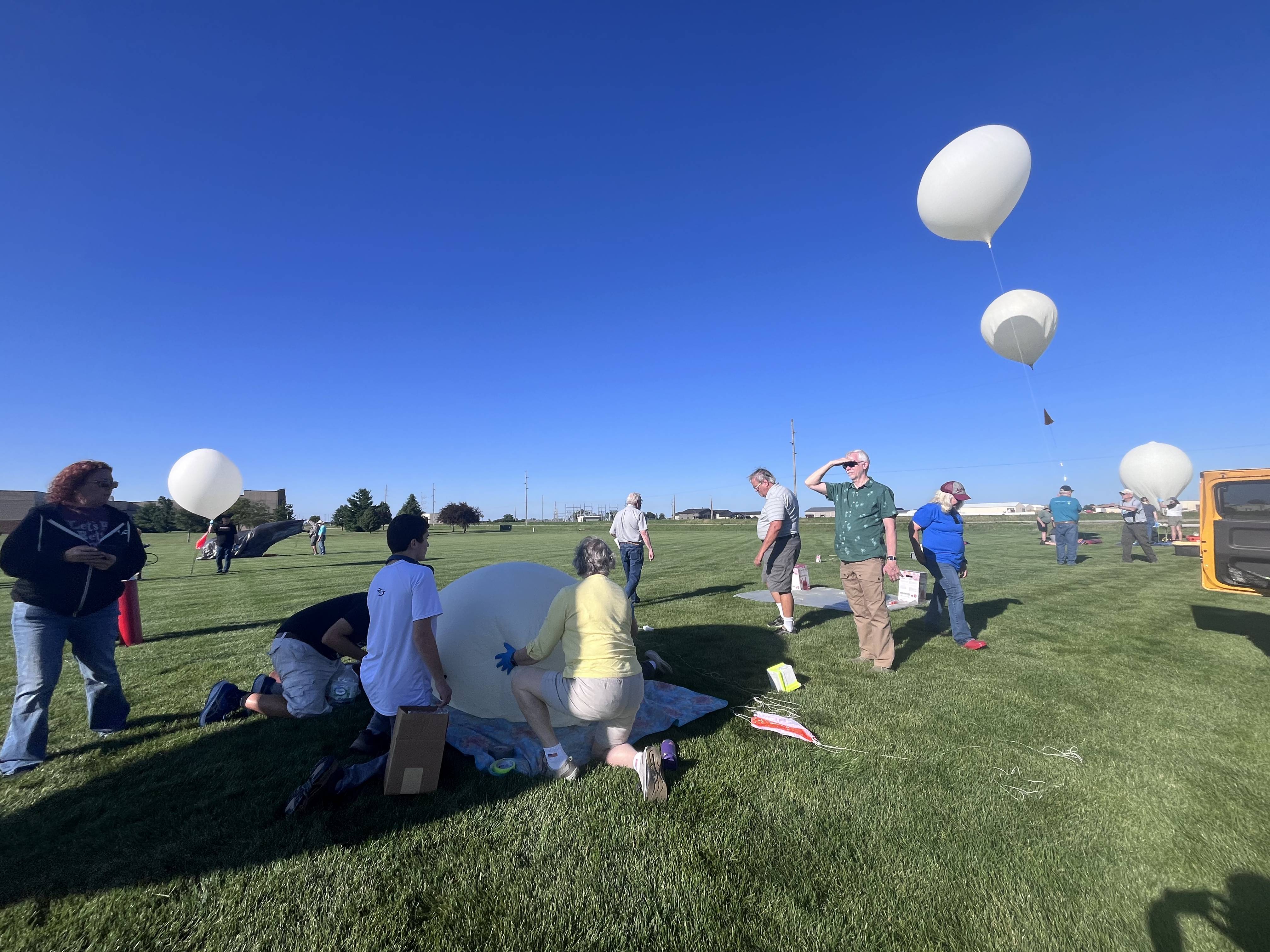
The flight was part of a group launch at GPSL hosted in Pella, Iowa with the group mass launch on June 20th which comes with a luxury: I didn’t have to find a lifting gas supplier!

Leadup

The biggest challenge with this flight is that we travelled to Cape Canaveral a month before the road trip to Iowa, so every quirky little flight part you can think of had to either be brought with on the trip to Florida first – or ordered online while I was down there.  I packed my three payloads, some radios, lots of launching gear but forgot a few key pieces.  While in Florida I was able to buy:

  • More 3x AA battery holders (thank you Amazon for making these easily available).  I use these ones with lids to mitigate batteries popping out of the box.
  • Kaymont 1000g balloon – who knew Kaymont’s distribution facility is in driving distance of the Cape?  I got to go pick it up in person!
  • Spherachutes 30″ ultralight chute (they ship quick despite customizable colors!)
  • More RTL-SDRs – turns out my primary one I left at home, and my backup SDR is entirely dead. Easy to acquire more Nooelec SMArt radios on Amazon.

I assembled everything in the weeks leading up to flight, prepared a DFM17 radiosonde which I think I flew on Flight 7 last year with SSHC, and tested it all out.

For this flight I used the exceptional K5RWK Balloonatics ground_station configuration, which runs a ka9q-radio server and tons (yes tons) of horus binary and wenet decoders as well as a UHF APRS decoder with direwolf attached to the ka9q-radio. In the past for multi-stream flights I’ve used home brew variants of CLI scripts to “tee” various bits of a passband to different decoders and this has worked well enough despite being a bit of work to set up let alone share with anyone else.  The Balloonatics version makes it so much more modular.  Using docker also means that you can define decoders on the fly during testing to try things.  This is not for everyone but as a regular docker user, this is incredible.  I expect to use this pattern more in the future.

Payloads

I had three payloads in hand:

  • DFM17 radiosonde running RS41ng broadcasting Horus Binary v2 on 432.900 MHz.  The venerable reused radiosonde never fails me.
  • Meshtastic on a Raspberry Pi using Portduino and a Pi hat.  I’ve flown this hardware before successfully but with incomplete results, so it’s good to fly it again!

Unfortunately I had a third payload prepared which did not fly:

  • Wenet v2 – upgraded in-place from what I flew last year from v1 to v2. It was working perfectly but somewhere in the 1300 miles of driving from Florida to Iowa the Pi camera cable cracked and the payload rendered useless. My spare cables? Back at home.

Launch

Arrival at launch site 7AM with a target mass liftoff of 8 AM which turned out to be more like 8:20.

Due to the Wenet payload mishap which kept me up past midnight, I was walking around the launch site at 7 am asking if anyone had a Raspberry Pi camera cable. Unsurprisingly, no one had one handy, and everyone was busy preparing their own payloads!  There was stuff happening everywhere, and even my own kids were distracted watching others string up payloads and inflate their balloons.

Since several of us were running the same shared balloonatics ground station configuration, the moment I turned on my 4FSK payload it had 5 receivers uploading to Sondehub.

I prepped payloads which was pretty straightforward, but I still need to get my payload-stringing-switching-things-on routine down a bit better. But once I strung it all up, I was ready to inflate. Since I was flying hydrogen for the first time, I needed to borrow a regulator/inflator which the K5RWK team loaned me their spare (thanks team!)

I missed the group launch by about 5 minutes which given my usual delays at launch sites seems like I was practically early!

Flight

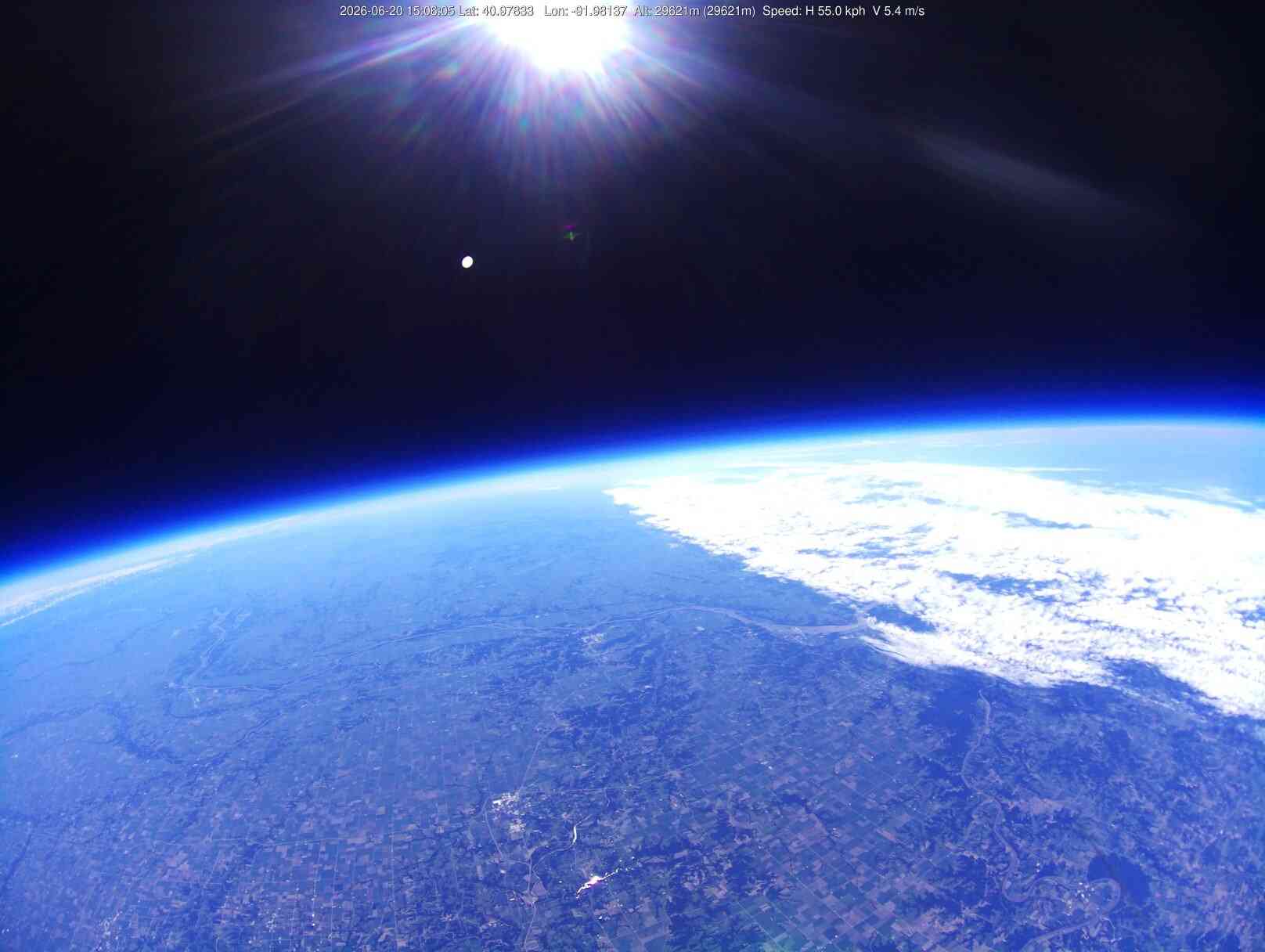
Flight was nice, albeit a bit worried about the ascent rate being a bit low.  The drive to the landing site was about 80 minutes; I picked a waypoint in Fairfield. We sat watching the balloon rise over 30km, and looked up, and saw plain as day our balloon not far from KE5GDB’s!  This balloon did have it’s Wenet payload downlinking images and we got this photo of our balloon:

We were able to see, from the ground, the two balloons flying next to each other, and watched until our balloon burst over 35km.

KE5GDB has a video of our balloon bursting from their Insta360 which I’ll post here when I get a hand on it.

Landing

The balloon’s initial descent was fast and the projected landing spot (on Sondehub and on Chasemapper) kept moving a lot more than expected as the balloon was coming down faster than projected.  Good news, it was closer and less driving with three kids that needed to all go to the bathroom and are anxious about balloon recoveries.

The Balloon-Trees-Water-Magnetism principle proved true; in a land of corn fields we found both trees and water in our landing site:

Randy KJ0RE and Zack W0ZC and the whole Project Traveller team happened to be not far behind ready to support since not only was I chasing a balloon but also driving a car with three kids that were definitely not going for a romp in the woods.

Recovery

As I sat at a gas station managing kids and talking to Zack, Randy charged ahead, spoke with a local land owner, got permission to go for a walk, and off he went – shortly later calling me on my mobile telling me where to find his truck and walk from.  I hitched a ride to the landing site, leaving the kids to sit this one out.

blue is where we parked; yellow is walking path; green marker is landing site

Armed with my HT, a bottle of water, shorts (foolish), and some tools from Zack for fetching payloads out of trees I hiked out to the landing spot.

First through corn fields:

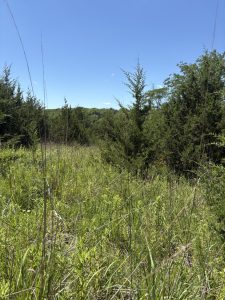
Then through knee-high brush with patches of thorn bushes and downed trees:

Eventually across the adorably named Little Lick Creek:


Finally arrived at the wooded landing area covered in ticks and with bloody shins.

the landing site was ’round here…see it yet?

It was nearly a mile of a walk which took me at least 30 minutes.  As expected the payloads were not easily found, but first and foremost, I had to find Randy!  He was using his HT to listen to the payload and try radio direction finding to get him closer to the site but he was nowhere to be found – even if I yelled, he didn’t seem to hear me.  Where on earth was he?

Luckily we both had cell phone service, and my call went through – only to learn that Randy had gone to the last known position for the experimental Meshtastic payload (red marker on the map), which sends imprecise position packets.  A computer stupidity had sent my comrade in the wrong direction!  It’s final position packet (red marker in the map above) was 120m away from the position of the DFM17 transmitter (green marker) whose GPS and position packets I trust much more. I’m glad we had the creek for relative positioning as this helped us figure out where each other were.  Once we got together, a bit of wandering around, then reality sunk in: where the heck was this thing?  It was certainly in the trees, but where exactly to look?

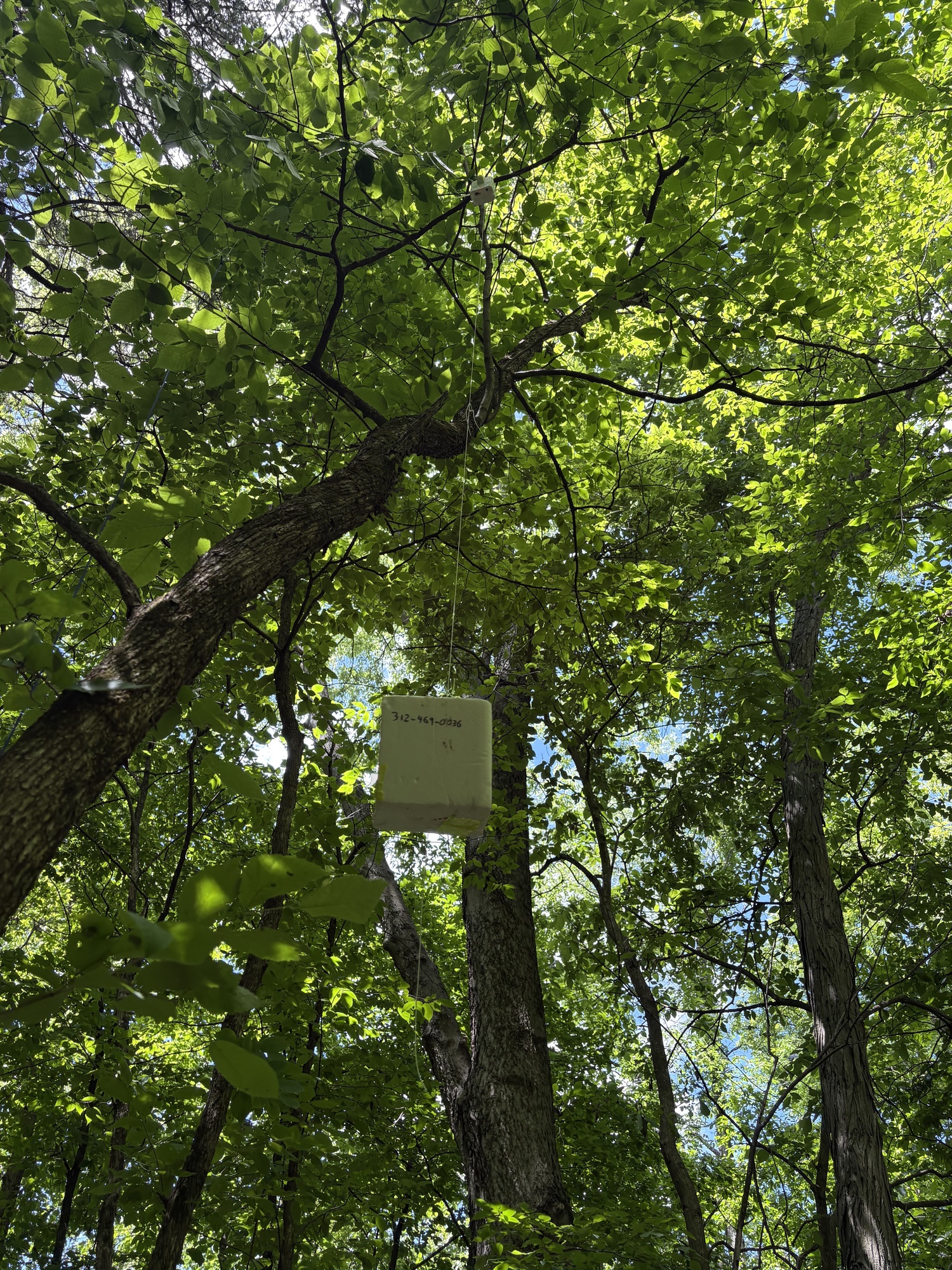
I don’t know how others do it, but after about 15 minutes of rather unplanned walking around, picking ticks off our legs, and sucking down water, Randy spotted it!  The balloon was mostly intact and had surrounded most of the parachute on landing about 20′ up, so it was not easy to see:

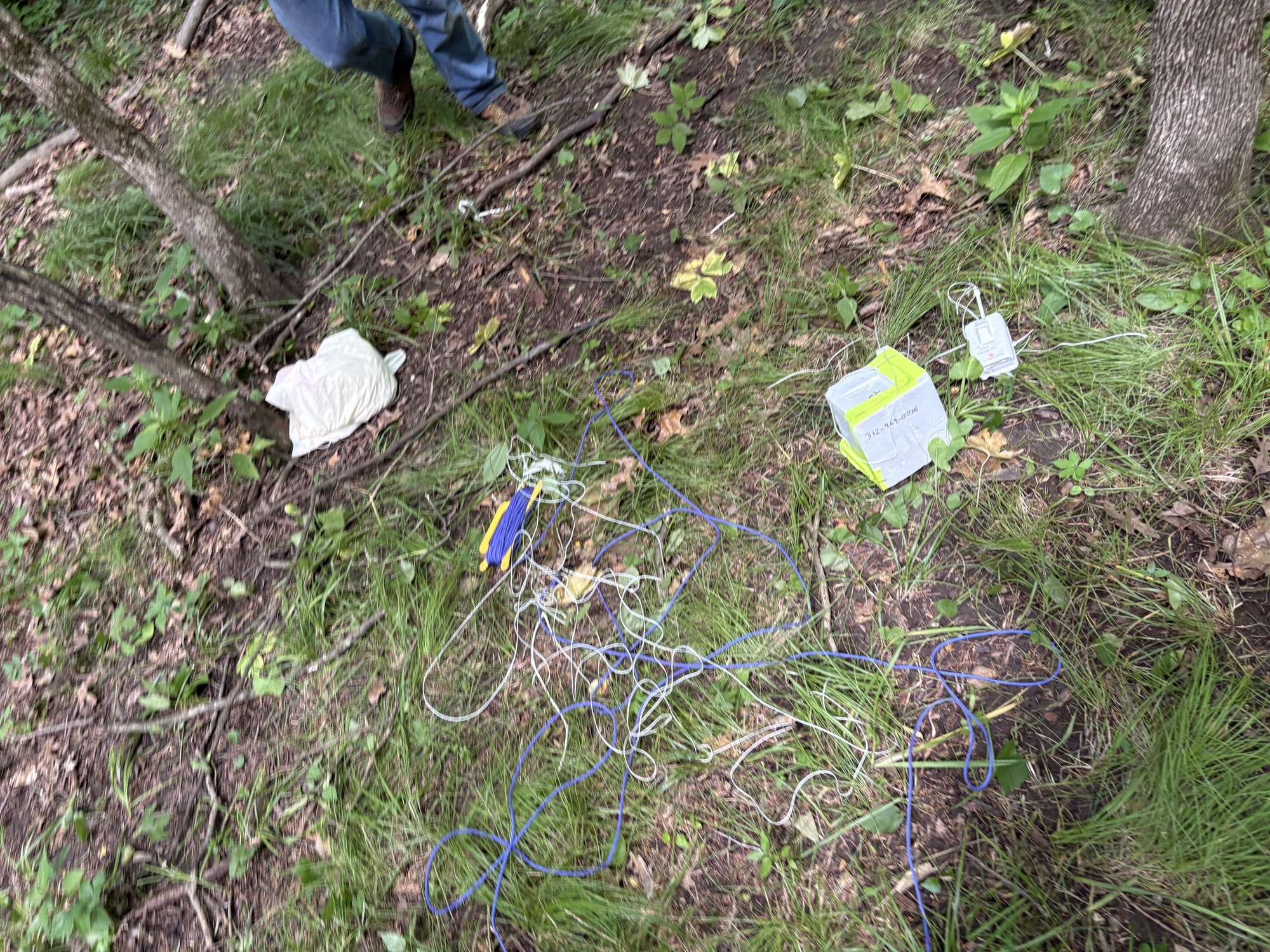
It took us another 20-30 minutes using a combination of dead trees to swat at it to pull it down which we managed to do and recover everything – the two payloads, the chute, all the line and balloon remnants.

The walk out was less eventful, over the creek, through a barbed wire fence, lots of trees, and we were greeted with snacks and an ice cold bottle of water by the Traveler team at our arrival back at the cars.

Success!

Flight data analysis

DFM17 Horus Binary v2

The DFM flew great as always.  Full telemetry on Sondehub Grafana is always fun to check out.  Because this transmitter was part of the balloonatics ground station plan, I had no less than five distinct receivers the minute I put a battery in (I put in a scratch battery for a few minutes to check reception before putting in a brand new flight battery).

There is something strange going on, perhaps with the multi-decoder setup we were running causing it to report clearly erroneous receive frequencies from time to time:

Zooming in – this RS41ng build is an “old” one and doesn’t have recent work which has temperature correction in the transmitter frequency, so this one still had a good bit of wobble during descent (about 3.9kHz total variance from top to bottom)…for my next flight I’ll probably fly this one alongside a latest version Horus Binary v3 payload with all the latest code.

This is a cheating result given that it was up in a tree, but upon landing, I was 0.8 miles away from the payload and was able to receive it from my monopole antenna on the roof of the car to get the landing position confirmation.  Radios are cool.

Meshtastic tracker “mtflyer”

The main weaknesses of this as a position tracker seen on previous flights were:

  • MQTT was unreliable
  • Position ambiguity built-in to the default channel means position broadcasts are of marginal utility (and actually can be detrimental for landing/recovery as Randy found!)
  • Logging data on-board was hard and fraught with interface inconsistencies so it was hard to figure out what was real.

This flight was incredibly different!  MQTT performed admirably; my data logger/relay to Sondehub worked great, and tons of nodes participated. Maybe Meshtastic firmware advances have allowed more packets to get through; maybe there are more nodes in Iowa than there were over Indiana last year; maybe my antenna orientation fix (cough duct tape cough) helped?

Node KD9PRC redd is my ground station node in my car, so of course it got a lot of packets – but look, that’s a ton of coverage!

The furthest recorded reception is !a2e1b03c W8MKG Router 📡 in Muskegon, MI while the balloon was up at ~35km right before burst, with a record distance of 543km!

There’s more to analyse from Meshtastic on-board the node that I haven’t yet gotten to but the altitude graph also tells a story:

The ascent portion of the flight had amazing coverage with 239 packets on ascent, basically a packet every 30 seconds which is expected.  Of those, 226 were relayed by nodes other than just my own ground station!

Descent is another story.  Did the radio get too cold?  Did the el-cheapo ™ GPS fail?  More to investigate.

Landing: I did get a packet at the landing site.  Unfortunately the annoying position ambiguity “feature” meant that it was useless.  My on private BalloonData channel has the precise position if I had needed it – but the Horus payload negated that need.

Overview

  • Balloon: Kaymont 1000g
  • Payload + chute + line mass: 278g
  • Lifting gas: Hydrogen (my first time; it was uneventful.). 1.92 m^3 of gas.
  • Parachute: Spherachutes 30″ ultralight which weighs a mere 24g
  • Maximum altitude: 35,413m (personal best)
  • Ascent rate: roughly 5m/s but maybe 5.5m/s at launch, slowing to 4m/s
  • Descent rate approaching landing: -6.8m/s vs design of -5.3m/s but that is assuming only 100g of balloon remnant mass; with the actual landing mass of 953g, we should have been at about -5.8m/s but presumably the chute was at least partially fouled by the balloon.
  • Balloon mass to land: 673g! Tons of it.
  • Neck lift: 1138g

Old News

There was a flight 7!  I never wrote it up.  I did however find the graph results of an important experiment that I ran on that flight.  Randy KJ0RE had worked on an early patch to RS41ng to try and compensate for the radio frequency drift.  I flew two DFM17s on a flight in ~April 2025, one with Randy’s patches, and the comparison…well…a picture is worth a thousand words.

This is all old news as this work has all been superseded but I love this graph.

What’s Next

Another Meshtastic flight would be fun. Horus Binary v3 + latest RS41ng test is in order. A fixed Wenet payload would be great.  We shall see!

Posted in Uncategorized | Leave a comment

Traintap, an EOT freight train parser/monitor

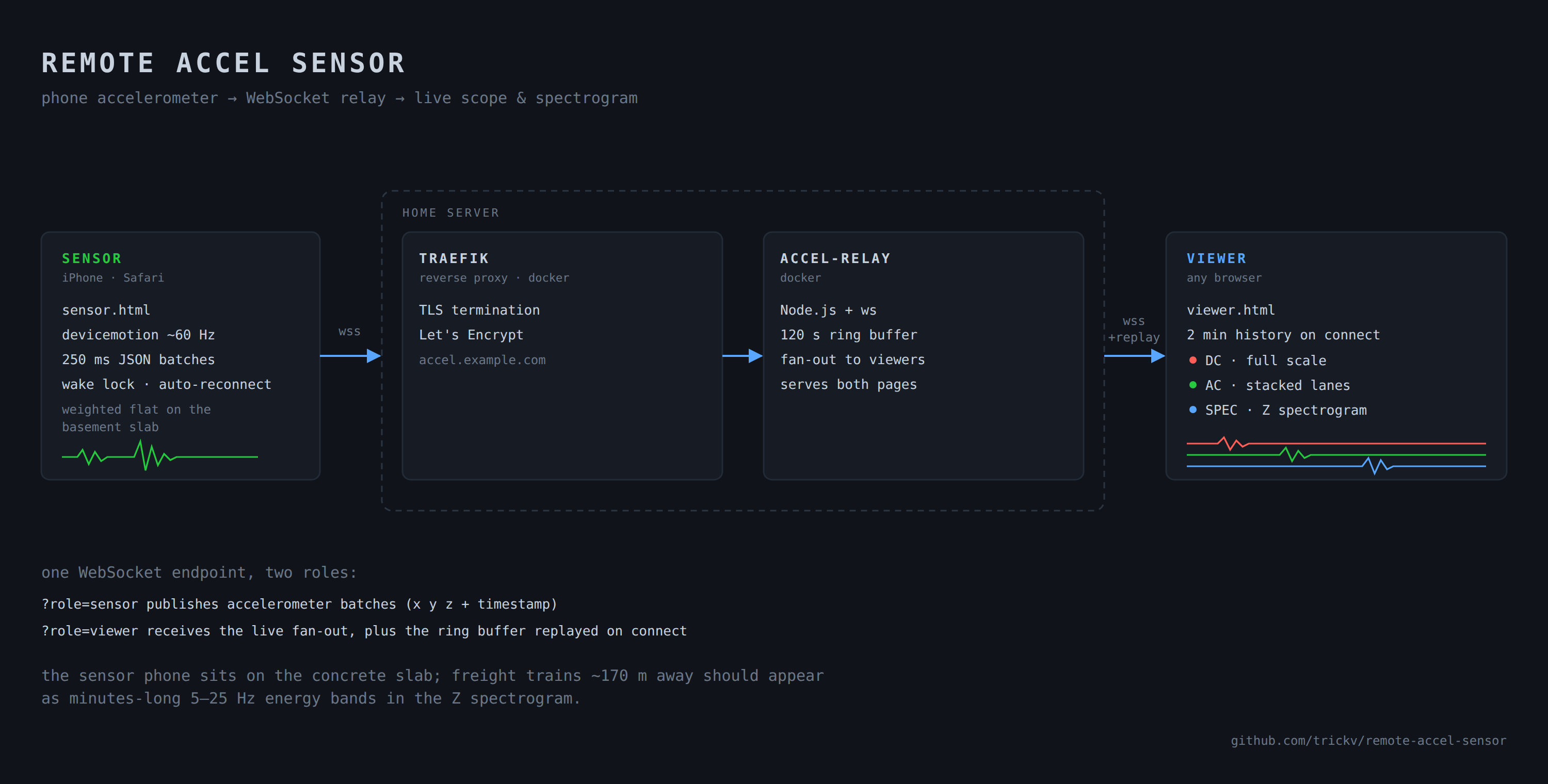
Living 100m down the street from a freight line means you (and the kids you raise) automatically become train enthusiasts. As my 7 years of living in this house comes to an end, I have had many daydreams of various nerdy “there’s a train going by” sensor schemes: A/V machine learning, accelerometers to detect the vibrations, but the only one I’ve actually gotten around to dabbling with is radio: EOT train signals.

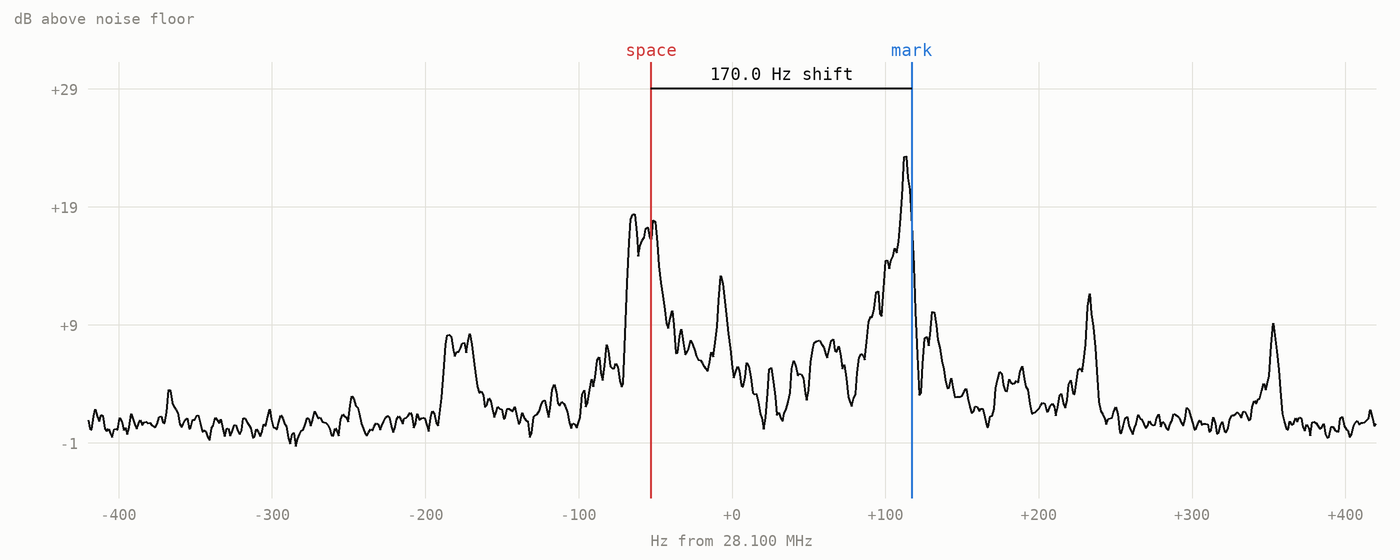
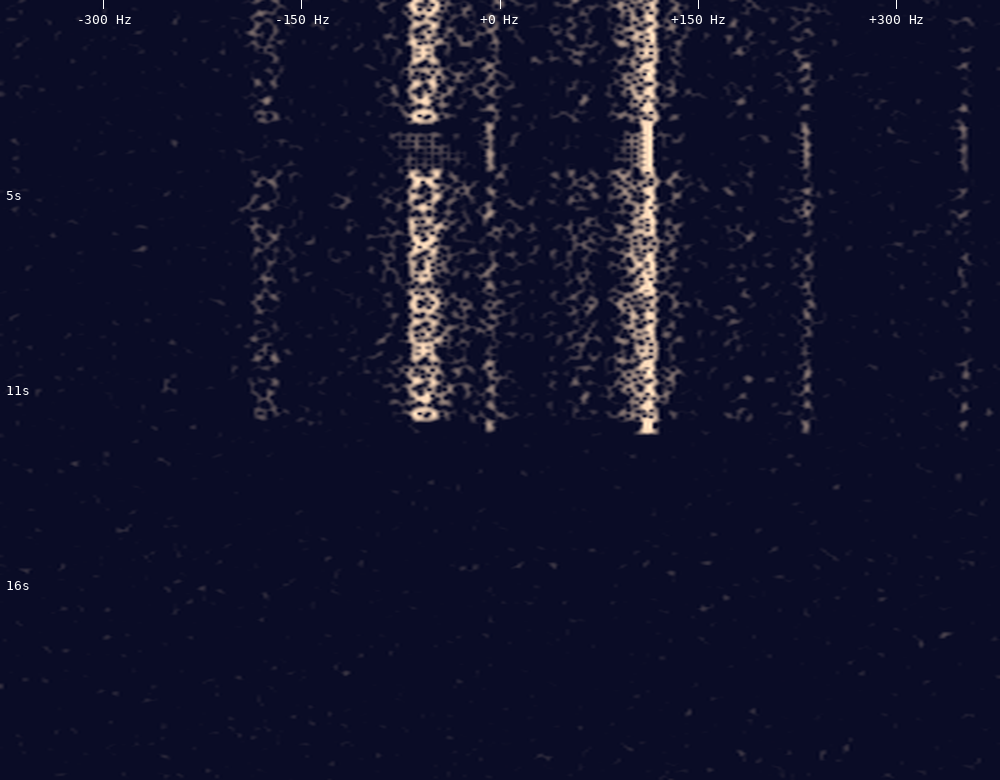
A few years back I did a multi-week study with a couple of SDRs monitoring the trains passing by, using SoftEOT, a Windows app. The data isn’t much to look at but I learned a lot. The setup was half the trick; you have to join and get approved for a private groups.io group, set up your SDR receiver filter, set up a virtual audio device, realize you aren’t running Windows, figure out Windows, get the software to run, and only then can you play with the data.

Train Signals

Union Pacific trains by me use End Of Train devices which basically replace the need for a caboose – a primary need of which is to regularly tell the locomotive “hey I’m still here, we haven’t disconnected.”

One big caveat with this: not all railroads use these devices anymore, and I’ve also found that my commuter Metra trains do not use them. I’ve yet to find any reliable radio source to detect a Metra train pass!

Tapping into the signal

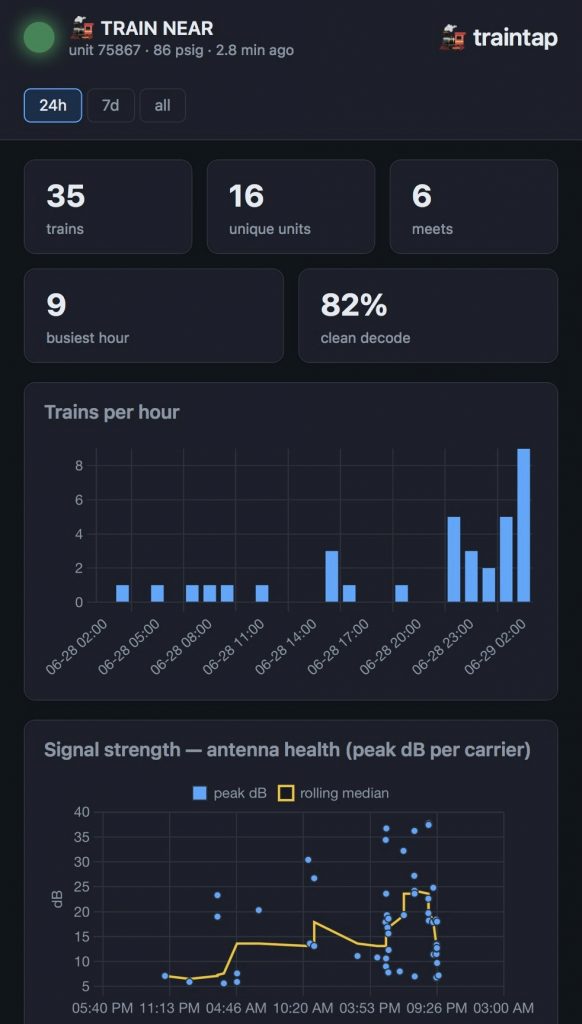
I wanted an easy way, using an RTL-SDR, start capturing packets and see what you can see. My real goal is just to figure out how many trains are going by. Enter traintap, my AI-coded simple app just for this: plug an SDR into a Linux computer, attach a 70cm antenna, and start the app. Assuming you capture some data, you’ll get a nice dashboard showing you the overview of what you capture:

traintap runs a simple, read-only web interface which gives you about all of the stats you can get out of these packets.

It is open source, GPL3 licensed to maintain compatibility with other projects from which Claude Code learned from.

As long as I’m living here, you can view my live dashboard at: https://traintap.yellow.v9n.us/

Starting prompt

It started as a pretty simple prompt to Claude Code. I plugged a spare SDR into my dev box and said:

Check out this RF signal; https://www.sigidwiki.com/wiki/End_of_Train_Device_(EOTD)

I have trains which go by my house and emit EOT and HOT signals. I have an RTL-SDR I can dedicate to the task. Can we write some kind of simple CLI process for Linux, perhaps based on PyEOT, which captures and decodes these signals? There’s a question of architecture – should we use an RTL I/Q stream natively, or perhaps use KA9Q-radio? Is it possible to “scan” between the HOT and EOT frequencies to try and get packets on both?

The rest followed pretty naturally and my biggest challenge was my own assumption that I was so close that antenna placement didn’t matter (it did!)

Summary

I will only be living near this train line for another month or so, so odds are I won’t maintain this forever – but pull requests and forks are very welcome. I’m always happy to talk trains!

EOT packets don’t tell you much about the train that is going by. I wish it would tell me fun things like the number of cars, the destination, etc but that’s not what it’s for.

It would be a cool project to get a handful of sensors along a line to predict when different level crossings will be closed. If anyone ever tries this, let me know!

Posted in Uncategorized | Leave a comment

Chasing AI: single-handedly programming a radio

We’re staying in Cape Canaveral for a month, right before GPSL, so as is predictable of me I brought a box full of radio gear to track radiosondes, capture AIS data, and anything else that piques my interest while we’re here.  I realized after texting a buddy this story that I should expand it for more to read.

I realized early on that the local Cape Canaveral Space Force Base launches old school LMS6-type radiosondes which are not as common as RS41 and DFM sondes. There I was the other day, watching a sonde come in for landing 2km from me, listening to the signal on my HT, without a decoder.  My RTL-SDR was broken and couldn’t track it; I was wishing that rdz_ttgo_sonde could decode LMS6 sondes.  The sonde likely landed out at sea but I was unable to track its last few km of descent.

This is the story of how I added LMS6 sthoring demoduupport to the TTGO radio, using Claude Code heavily.

I originally wrote this as a story to a friend, “I have gotten so lazy about things I used to do. I am literally programming a radio right now which is connected to my laptop on USB, across the room since I’m holding the baby, using remote control, flashing firmware, which has an experimental protocol on it that CC wrote”

It’s not laziness, it’s friction

When I say I’ve gotten lazy, what I actually mean is that the activation energy for a whole class of tasks has collapsed to near zero.

Think about what flashing firmware on an oddball radio involves. You find the right tool. You discover it needs a USB driver of some sort. You Google an error, land in a forum thread from 2014, try three things that don’t work, get annoyed, and put the radio back in the drawer. Tomorrow you’ll have the energy. Except tomorrow you don’t, and now it’s a “someday” project living in a box for a year.

The work was never the hours. The work was the walls. You’d hit one, lose momentum, and set the whole thing down. The reason these projects “took days” is that most of those days were spent not doing them.

What agentic AI actually does, for me anyway, is absorb the walls.

Predicting landfall

Side track from the programming nerdery: I did ask Cowork to build an ocean-water movement model to see where it might wash up.  Ultimately the odds of me ever finding it were incredibly low and thus I did not find it, but it was fun to try and produced a beautiful artifact (click on it!)

click for the interactive analysis version

Adding the LMS6 decoder to rdz_ttgo_sonde

After the sonde landed I sat there thinking “this can’t be too hard to add” – but authoring demodulators like this is a field of its own, one in which I don’t have much experience.  Reference code exists in the rs1729/RS project, upon which radiosonde_auto_rx uses to decode the data.  The RS project is GPL-3 and rdz_ttgo_sonde is GPL-2+ so the code can be incorporated into rdz_ttgo_sonde!  I asked Claude – it said the project would take days.

It was done 15 minutes later.

Code reviews, and my own skepticism, took an hour.  Was this worthy of an upstream pull request? This code would be added to a binary installed on countless devices when most users will never even use it. But after some quizzing of Claude and a bit of verification myself, I’m reasonably satisfied thus far.  Let’s test it!

Uploading to a new board

I plugged in a brand new TTGO Lora32 to my (also new) Mac laptop only to find I didn’t have the requisite CH34x serial driver.  In 2026, serial port drivers are not yet upstream, something Linux figured out a long time ago!

Claude led me down a rabbit hole of which driver to install, but in the end, I got there (it still takes an unfortunate amount of experience to recognize when an agent hasn’t done the research for the latest information by doing a web search – it was quoting me >5 year old advice for Intel-CPU Macs).

At this point, I ran /remote-control to operate from my phone while holding a sleeping/fussy baby.  One handed!

It then set up a virtualenv, installed the firmware upload utility esptool, identified the board, backed up the stock firmware for me as a convenience, and uploaded our new build of rdz_ttgo_sonde with the LMS6 patch.

I’ve done all of this before on other boards/laptops.  It would’ve taken me hours (during which fussy baby would have derailed me and spread the work across a day or two).  This took me less than an hour.  I sat there, holding the baby, configuring my newly minted radio to join the local wifi, the frequencies and decoders to try, and more.  What’s more – it connected straight to rdzSonde Go which is gratifying!

Real-world testing

Belt and braces: having just brought online a new RTL-SDR auto_rx station sitting next to the TTGO, I had an excellent local data set to test against.  I don’t yet want to start uploading to Sondehub for fear of streaming errant data, so for now my goal is local logging.  rdz_ttgo_sonde has AXUDP output which Claude happily wrote a logger daemon for, all to find that the AXUDP/AX25 encoding truncates the lat/lon precision that we’re receiving.  There is also MQTT support which I’ve settled on as the best reference data set.  Running up a Mosquitto broker and subscriber took minutes and was done mid-flight of the first or second LMS6 sonde I saw.

Initial reports showed one glaring bug: all my frames received were dated 1970-01-01.  This was easy enough for Claude to spot and fix.  Otherwise: frame by frame, everything I’m receiving appears identical to what I’m receiving with auto_rx.

Claude Code Monitors

This is an excellent use case for Monitors: I have it checking in on the MQTT logs to see if we’re tracking any Sondes.  Once it sees that we have – and that the flight is no longer logging on either rdz_ttgo_sonde (via MQTT) or my local auto_rx station, it runs a comparison, showing which stations received how many packets and compares frame-by-frame data.

It surprised me this evening: the Space Force launched an RS41 sonde!  (Please tell me they didn’t just run out of LMS6 sondes…)

Many hats

I was motivated to add this decoder only briefly while I was short an SDR, but I was able to make excellent progress in a matter of hours across just a couple of otherwise-busy days.  AI enabled me to wear many hats – ones which I’m accustomed to, but many are dusty/rusty and I would not have found the time or energy to wear:

  1. C++ programmer and tester not to mention modem aficionado
  2. ESP32 compiling guru
  3. MacOS sysadmin
  4. Data comparison and summarization

All stuff I can do – although #1 would have stopped me on investment of time.  I’d rather be writing this blog, taking my kids to Kennedy Space Center, and photographing rockets!

So yes, I have gotten lazy.  Lazy enough to finally get stuff done.

📧 Chasing AI: Get notified of new posts

Enter your email to be notified when I publish something new:


I’ll only email you about new blog posts. No spam.
Posted in Uncategorized | Tagged | Comments Off on Chasing AI: single-handedly programming a radio

Chasing AI: Who needs software anyway?

A friend said to me the other day, “In the future, there won’t even be software. It’ll all be AI.”

Sounds crazy right?  Or is it?

How AI replaced software (gpsd) for me today

It clicked for me today when I impulsively plugged an old USB GPS receiver into my laptop just to see if it worked.  I opened up minicom to see if it would get a fix, and quickly glazed over watching the stream of familiar but uninteresting log messages:

$GPGGA,,,,,,0,00,99.99,,,,,,*48
$GPGSA,A,1,,,,,,,,,,,,,99.99,99.99,99.99*30
$GPGLL,,,,,,V,N*64
$GPRMC,,V,,,,,,,,,,N*53
$GPVTG,,,,,,,,,N*30
$GPGGA,,,,,,0,00,99.99,,,,,,*48
$GPGSA,A,1,,,,,,,,,,,,,99.99,99.99,99.99*30
$GPGLL,,,,,,V,N*64
$GPRMC,,V,,,,,,,,,,N*53
$GPVTG,,,,,,,,,N*30
$GPGGA,,,,,,0,00,99.99,,,,,,*48
$GPGSA,A,1,,,,,,,,,,,,,99.99,99.99,99.99*30
$GPGSV,1,1,01,24,,,28*74
$GPGLL,,,,,,V,N*64
$GPRMC,,V,,,,,,,,,,N*53
$GPVTG,,,,,,,,,N*30
$GPGGA,,,,,,0,00,99.99,,,,,,*48
$GPGSA,A,1,,,,,,,,,,,,,99.99,99.99,99.99*30
$GPGLL,,,,,,V,N*64
$GPRMC,,V,,,,,,,,,,N*53
$GPVTG,,,,,,,,,N*30
$GPGGA,,,,,,0,00,99.99,,,,,,*48
$GPGSA,A,1,,,,,,,,,,,,,99.99,99.99,99.99*30

Those familiar with the GPS NMEA protocol can squint their eyes at this and can infer:

  1. It doesn’t have a GPS fix yet ($GPGGA,,,,,,0,00,99.99,,,,,,*48 shows no latitude/longitude, just a bunch of empty comma-delimited fields)
  2. It can see one satellite (the odd $GPGSV,1,1,01,24,,,28*74)

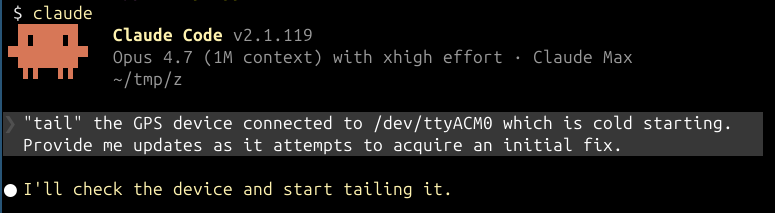
We have gpsd for this.  I don’t need to squint at this telemetry stream.  However a thought occurred to me: while I don’t have gpsd installed and ready to fire up on this GPS receiver, I do have a flexible AI agent I can throw at it.  It’s also quite possible that this GPS unit will never get a fix, so the event log of it finding specific satellites is interesting…it might be all that ever happens!

Claude wrote a bit of code to stream the contents of /dev/ttyACM0 to a log file on disk, and a Monitor process to provide updates back to the main agent loop.  It even detected the model of the GPS:

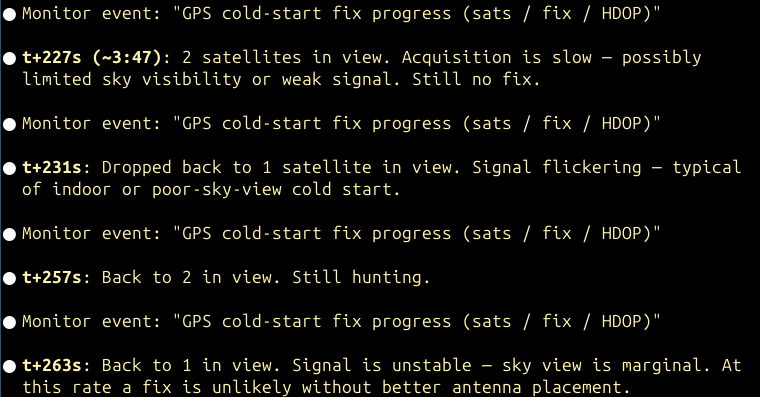
It then went from a stream of noisy events to something more useful.  It started to get events as it recognized more satellites:

This quickly was just noise.  I started asking it questions.  Will it ever get signal or is the placement just too bad?  How long do I need to wait on a cold start in a sub-optimal deployment environment like on my desk, below a monitor, indoors like I am trying right now?

While it monitored, I asked questions and it taught me things: GPS satellites move slowly across the sky, so flickering number of satellites in view is unlikely to be movement across the sky – it’s just weak signals.  This isn’t Starlink.

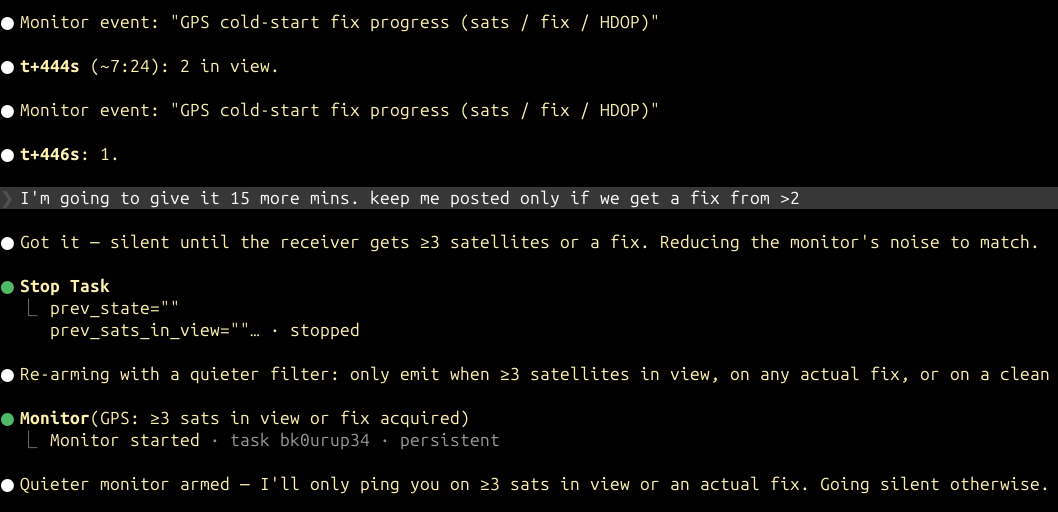
Then my friend’s point clicked.  I wanted less noise and I wanted to wait, so I let it keep trying and I asked it to rewrite it’s “software”:

I reprogrammed my “GPS status application” – Claude Code – on the fly.

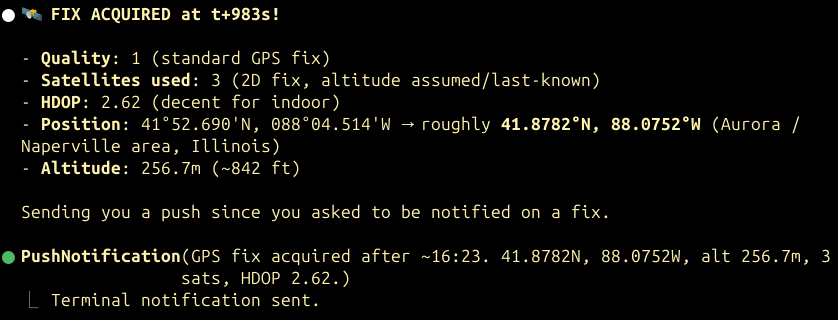
The GPS eventually found a third satellite and after a few more minutes it got a fix as I had hoped for:

Could I write my own GPSd?  Sure I could.  But that’s not the point – the point is that using an AI agent in-situ means you don’t have to write the software up-front.  You don’t always need requirements and a plan like you did before the AI era.  Software can even be ephemeral like today’s exercise – none of the code it used even hit disk.

Here’s the full transcript if you’re curious to spelunk!

Further afield with OpenClaw

One of my OpenClaw experiments is to use it to track grocery spending and prices over time.  However I’m refusing to write any code right now.  All I’m doing right now is capturing data (photos of receipts) over time.  I know I’ll want to ask questions like “has the cost per pound of beef gone up over the past three months?”

My strategy for this is not to just optimize for the answers, but to see what questions the data set I’m reasonably able to collect can even answer.  Receipts aren’t perfect – will they prove useful?  I’m not going to code myself into a corner – instead I’m going to collect data and when we have enough, get the AI agent to build some analysis tools to try and answer my question.  Time will tell.

Challenging your own assumptions

Imagine the world of computing today had speedy NVRAM technologies ever competed with the volatile RAM + non-volatile “slow” disks, where applications have a distinction between running and not running.  Completely different mind set.  We need to apply that kind of thinking to AI!

We all know AI agents can write great code, but we’re still stuck in the old way of thinking that the software is the hard part.

Next time you think you need software, ask yourself: can an AI agent just do this for me?

📧 Chasing AI: Get notified of new posts

Enter your email to be notified when I publish something new:


I’ll only email you about new blog posts. No spam.

Posted in Uncategorized | Comments Off on Chasing AI: Who needs software anyway?

The Impossible Job: Recovering a failing HFS+ external disk

A month or so back I overheard a conversation in my F3 Wheaton exercise group about a failed portable USB hard drive. The owner is professor Matthew Millner who has traveled as much as I have, has kids like me with priceless photos on that disk, and has ten years of PhD work and life on the disk.  Irreplaceable data.   I had to sit down and ask if I could help! If that was my data, I’d do anything to get it back!

Here’s how, over the span of 59 days, I was able to help.

I know, I know, people should make backups and/or use cloud storage.  But sometimes you don’t, and you just have to make the best of it.  He’s been hearing the lecture on backups for the past year since the disk died.  But as my grandfather-in-law would say, “If wishes were fishes, we’d all have a fry.”  Life is not a Douglas Adams novel: you can’t go back in time.  But you can try to do something about it.  The disk spins and shows a directory listing but none of the files are readable.  Some of it must be readable, right?

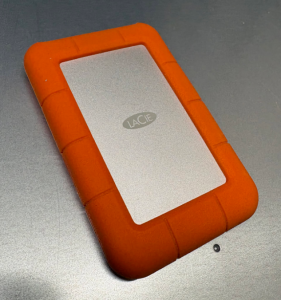
with all that padding around two spinning platters, how could it ever fail?

This is the story of how I helped get it back! I am not a hard drive recovery professional (and no, I did not stay at a Holiday Inn Express last night.) I have been taking computer hard drives apart since I was about ten years old.  In high school & college I went through a spree of dodgy 60GB hard drives which were fortunately in a RAID5 and I learned about freezer tricks, heat sinks+ice cubes, and the power of patient persistence. I’ve learned a few tricks since then that help: a sprinkle of microelectronics, and a dash of AI. Years of proximity to system administration taught me some tricks too; volume snapshots and copy-on-write filesystems and a sixth sense for failure modes.

The Impossible Job: a decade’s worth of PhD life on a failing 2TB drive

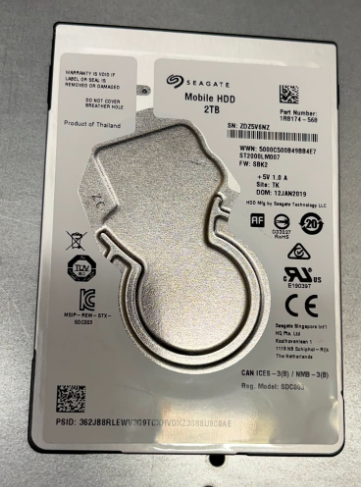
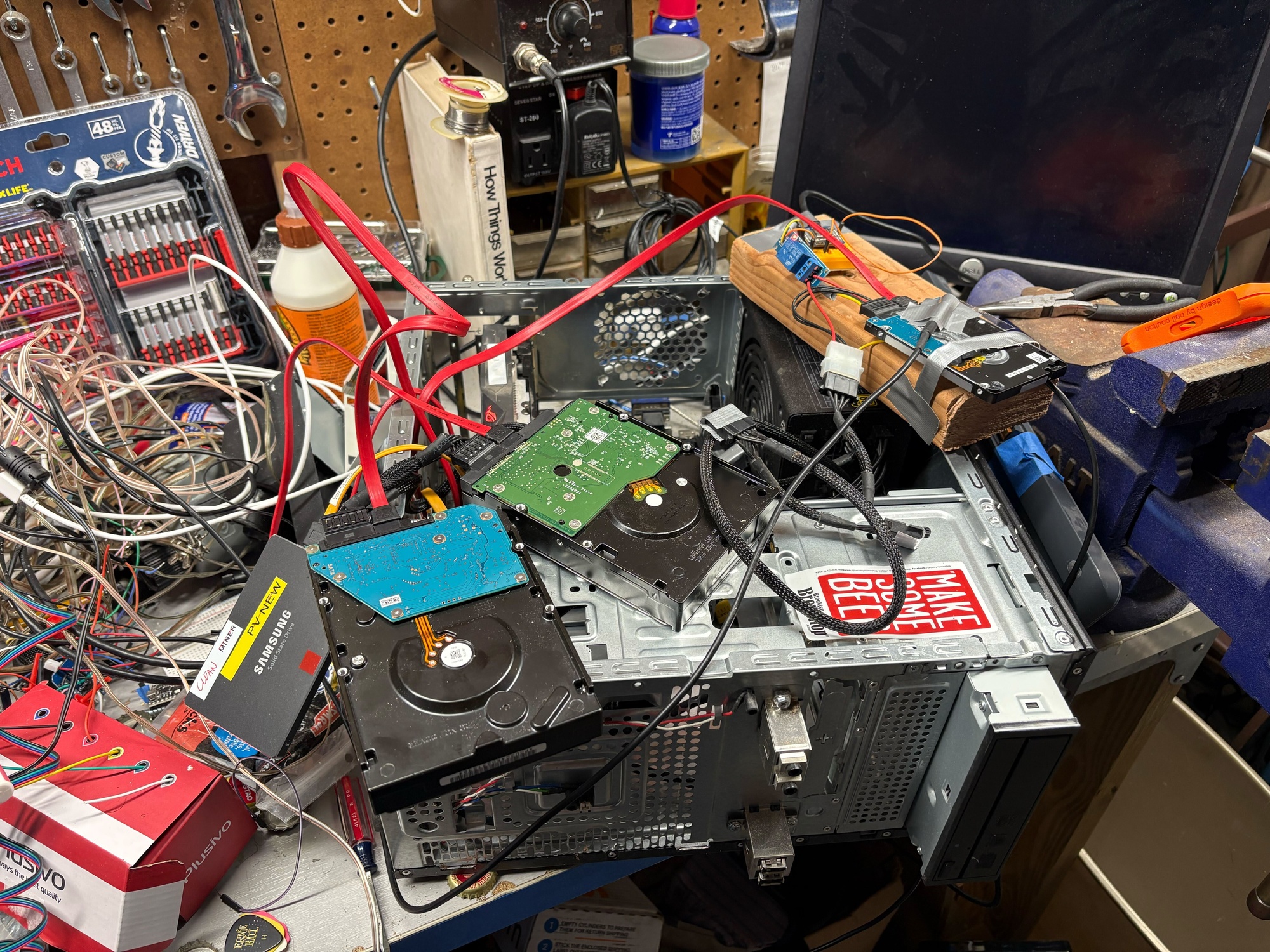
The disk is a LaCie 2TB portable USB hard drive.  Inside the package is a USB-SATA adapter with a standard 2.5″ SATA disk, a Seagate ST2000LM007 which has two spinning platters inside of it.

I plugged the USB enclosure in, got a directory listing, and the minute I tried to read anything it stopped.  That’s not a good sign!  I half expected to hear the traditional clicking noises of a drive which can’t seek at all and continually tries to re-seek, but I did not hear any so I was encouraged.  I moaned when I saw it was HFS+, but in retrospect, that was not a problem.  Every time I tried something, I had to unplug and re-plug the disk to get it to respond again.  Using the USB enclosure vs SATA directly didn’t change the behavior either.

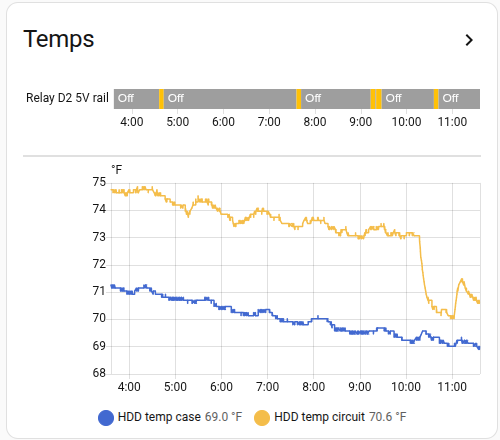
I tried some fans to cool the disk to no effect, to the point of attaching some DS18B20 temperature sensors to each side of the disk to see if it was getting dangerously hot – it was not. But the graphs (in Home Assistant of course) proved useful later on.

First Contact: Why did dd keep dying at 40GB?

I suppose a hard drive expert can answer that question better than me!

My next step was to try cloning the disk with dd on linux.  Uncle Mintel left me a small cache of big 3.5″ old 2TB disks, and after some quick smartctl verification tests, I picked a couple that looked fit for the job.  I set up the disks on my workbench in the basement in an old PC that I use for GPU experiments, and started to try to clone the disk with dd.  Every time: it hit 40GB, the disk stopped, and the SATA link reset.  It needed a power cycle.  I clearly couldn’t afford to spend time re-reading the same blocks on the disk, so I needed a new plan.

ddrescue to the rescue!

ddrescue is dd but for recovery from a dying disk.  I’d never used it before, but it is exactly what I needed.

You point it at a source and destination disk, it tries to read, and keeps a map of every block it’s tried, what was copied successfully to the target disk, and what produced read errors.  You can run it iteratively, as many times as you want.

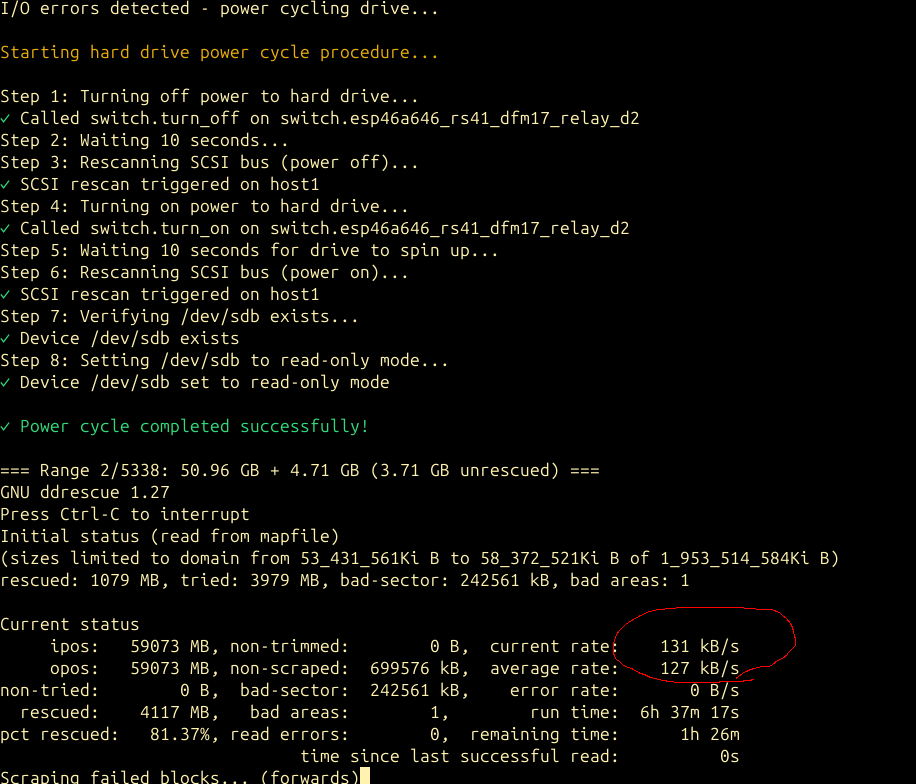
My disk was special: it never actually returned read errors; the disk simply performed so slowly that the host never saw a series of read errors – it just saw the disk time out and go away.  The useful part: you can restart ddrescue ad nauseum, at any arbitrary point on the disk, and it will focus on that area of the disk.  I quickly found that jumping ahead to 60GB that I could read the next 20-30GB cleanly.  However I’d eventually run into one of two problems: the disk would timeout and reset and need a power cycle, or a second failure mode emerged: the disk would read at 131kB/sec.  Mysterious?  Probably not – 131kB/sec is exactly 1000x slower than the “normal” read rate of the disk.  Presumably the disk was moving slowly because it was having to retry reads 1000x and using conservative error correction (which should be a pretty good indication of a physical failure, but I persisted!)

The problem with power cycling the disk all the time

I mean sure it’s annoying.  But what was really annoying to me was that it was in my basement; on top of which we have a newly-walking 1-year old baby.  I had to open the gate, go down; she’d want to come with so I’d grab her.  Pulling a cable out of a disk is a two handed operation, so I’d set her down on the basement floor, do the cable dance, pull out my SSH client on my phone, and tell the OS to refresh the SATA host.  Then grab the baby, go back upstairs, close the basement gate, set the baby down.  This got tiring quickly.

I’d learned a few years back that SATA host ports on Linux can be listed:

for host in /sys/class/scsi_host/host*; do
 h=$(basename $host)
 ata=$(readlink $host | grep -oP 'ata\d+')
 if [ -e $host/device/target* ]; then
  blk=$(ls $host/device/target*/*/block/)
  model=$(cat $host/device/target*/*/model)
 else
  blk="<none>"
  model="<none>"
 fi
 echo "$ata -> $h -> $blk -> $model"
done

For example, my file server:

root@minor:~# ./list-sata-devices 
ata1 -> host0 -> sda -> Samsung SSD 850 
ata2 -> host1 -> sdb -> Samsung SSD 850 
ata3 -> host2 -> <none> -> <none>
ata4 -> host3 -> <none> -> <none>
ata5 -> host4 -> sdc -> Samsung SSD 850 
ata6 -> host5 -> sdd -> Samsung SSD 850

You can then tell the scsi host to refresh a port that you just hotplugged:

echo "- - -" > /sys/class/scsi_host/host4/scan

I’ve yet to find a consumer grade SATA host which doesn’t tolerate hotplugging.

I had that – but I needed an automated way to power cycle the disk and save both me and the 1-year old the trips to the basement.

ESPHome ESP8266 + relay on the 5V Rail

Because hey, why not?  I have north of 30 esp8266 MCUs that I’ve built stuff on, all plugged into Home Assistant.  I borrowed a relay node that I use to power cycle DFM radiosondes when on the bench and wired it up to the 5V rail on a SATA power adapter (I left 12V unplugged given that little disks don’t even use the 12V rail from what I’ve read.)  A HASS auth token and a bit of curl later, and I had a script that did an end-to-end power cycle of the disk:

  • Power off the disk and wait a few seconds.
  • Refresh the SCSI (SATA) port to make sure the kernel sees the disk is gone
  • Power on the disk and wait a few seconds
  • Refresh the SCSI port again.
  • If the disk didn’t come back, sleep for 60 seconds and try once more, and if it still doesn’t work, print a big error on the screen and wait for user input.

This setup was the key.  I left the basement one day, and didn’t touch the host for an entire month afterwards as I slowly worked on it.

Timeouts as a Strategy: Skipping the Tar Pits

F3 AO pun not intended

Now that I had a working power cycle procedure, I could try reading the entire disk in segments.  I wrote a simple wrapper which ran ddrescue at 10GB increments, wrapped in a bash “timeout 120” which meant that if I hit one of those 131kB/sec slow spots, or the disk timed out and needed a power cycle, that ddrescue would exit out.  The loop turned into:

  • For x in (10GB segments up to 2000GB)
    • timeout 120 ddrescue read as much as you can
    • Test the disk. Is it offline?  If so, power cycle it with the procedure above.

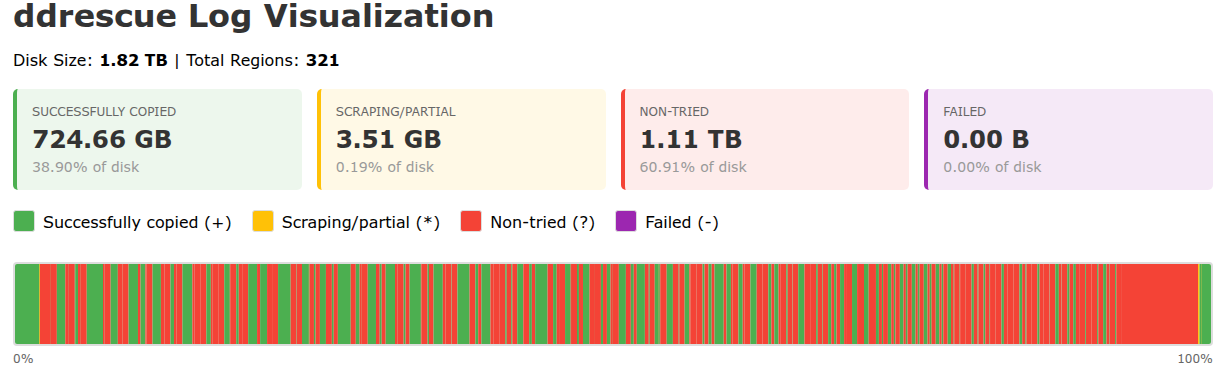
This was gold.  In a couple of days, I had recovered 724GB of the disk’s total 2000GB area.

Making it Visible: Writing ddrescue log visualizers & HA graphs

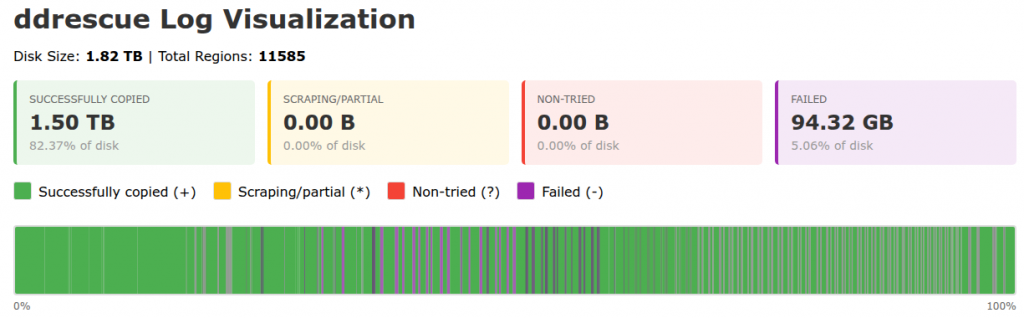
The log file is a long machine-readable text file not meant for humans.  It has one block range per line, so on every ddrescue run it got longer.  The ddrescuelog CLI tool didn’t work for me for some reason.  I threw this one at Claude Code which wrote a CLI and HTML visualizer:

I already had the relay switch visible on Home Assistant, which yielded a history graph showing if the disk was powered on or off and the corresponding temperature sensors below it, so you can glance at what was happening autonomously while you were sleeping:

I went further – as regular readers may know, I am obsessed with getting every bit of my data into Home Assistant…read on!

Zooming In: From 10G to 1G to 100M resolution passes

I revised my wrapper script to then do 1G segment passes, with a correspondingly shorter timeout, and eventually I went on to 100M segments.  Smaller segments took much longer; a lot of the remaining data surface area was reading at the slow 131kB/sec rate.  Every now and again, my power cycle controller would hang – I’ve found that a Home Assistant server hang has weird knock-on effects for my esp8266 nodes.  OneWire temperature sensors start returning 80C like parasitic power problems and my relay GPIO would stop toggling, and I’d have to power cycle the node! Still unresolved.

At the completion of the 100M chunk pass, I had a lot more of the data, but I estimated that if I let it run on every block, it would take another 45 days to read it all at 131kB/sec – and that’s not counting power cycles (which became so numerous I stopped paying attention and just kept hoping that the next power cycle would not be the disk’s last.)

Tangent: proof of life (and an excuse to use another hard drive)

I needed to see if I was getting anywhere. I took a few hours’ pause from ddrescue and cloned my recovery target disk over to a second spare online 2TB disk. Pro tip: hotplug disk names like /dev/sdd are not stable across reboots! You knew that. Check your serial numbers or disk device IDs; fortunately in this entire process I never rebooted once (nor did the mains so much as flicker) until the process was complete.

Once my dd to the spare disk was complete, I wanted to mount the volume and run fsck_hfs but I also wanted to snapshot and work with a copy-on-write (CoW) image of the disk. The underlying partition was 100% the size of the physical disk, so the CoW store needed to live elsewhere. My OS disk is a mostly empty 1TB lvm volume which unhelpfully is 100% allocated and I didn’t want to go offline just to lvresize.

I asked Claude.  It’s a pretty good sysadmin!  I created my CoW store as a file on the OS disk, made a loopback device, and used the dm-snapshot method.  Worked perfectly.

I ran fsck and mounted the volume.  I clicked around.  My jaw hit the floor. Even with many GB still to recover, I had tons of photos and sent the owner some proof-of-life photos!  Needless to say, he was excited!

The Breakthrough: Reading the HFS+ allocation file (aka bitmap)

Big thank you to Matthijs Kooijman for their article Recovering data from a failing hard disk with HFS+

This article described a lot of the same challenges I had, and coincidentally also the same filesystem.  The power cycling tricks described there never worked for me, but the HFS+ pointers absolutely did: HFS+ maintains an allocation file which gives a map of which blocks on the disk were in use.  Cross-reference this with the ddrescue log file, and I was in business. I knew exactly which blocks to focus on recovering!

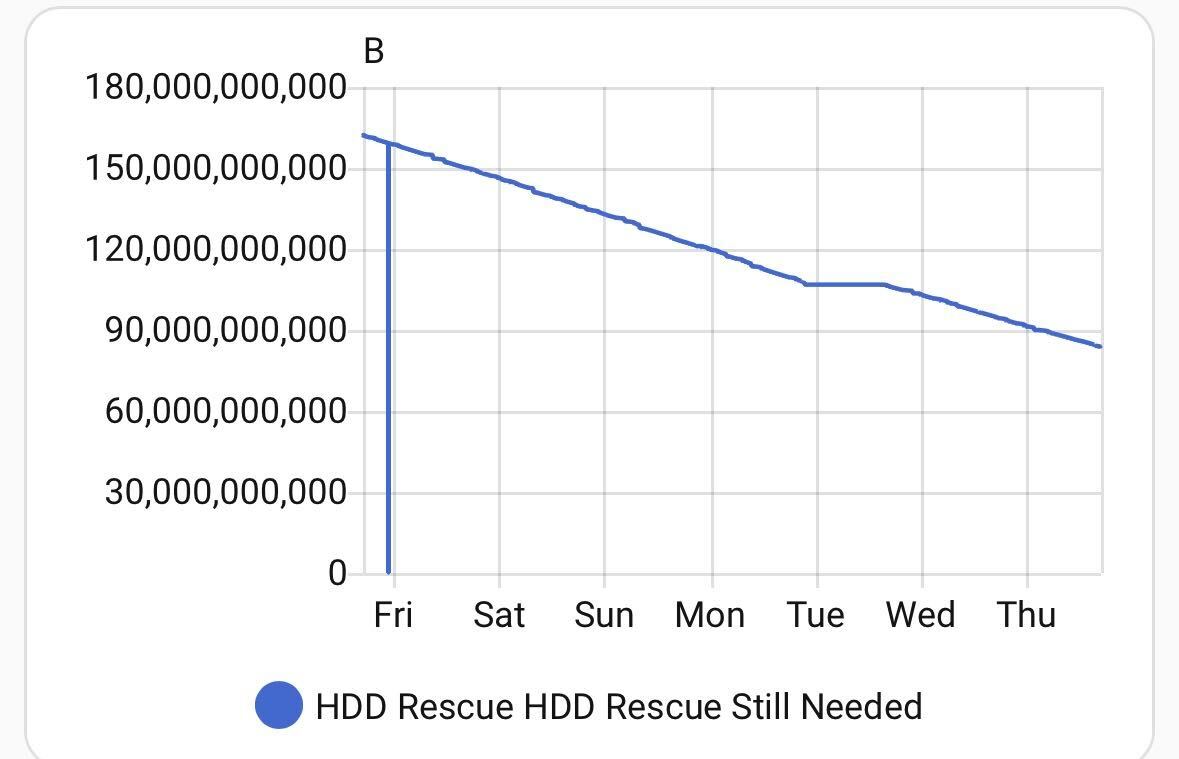
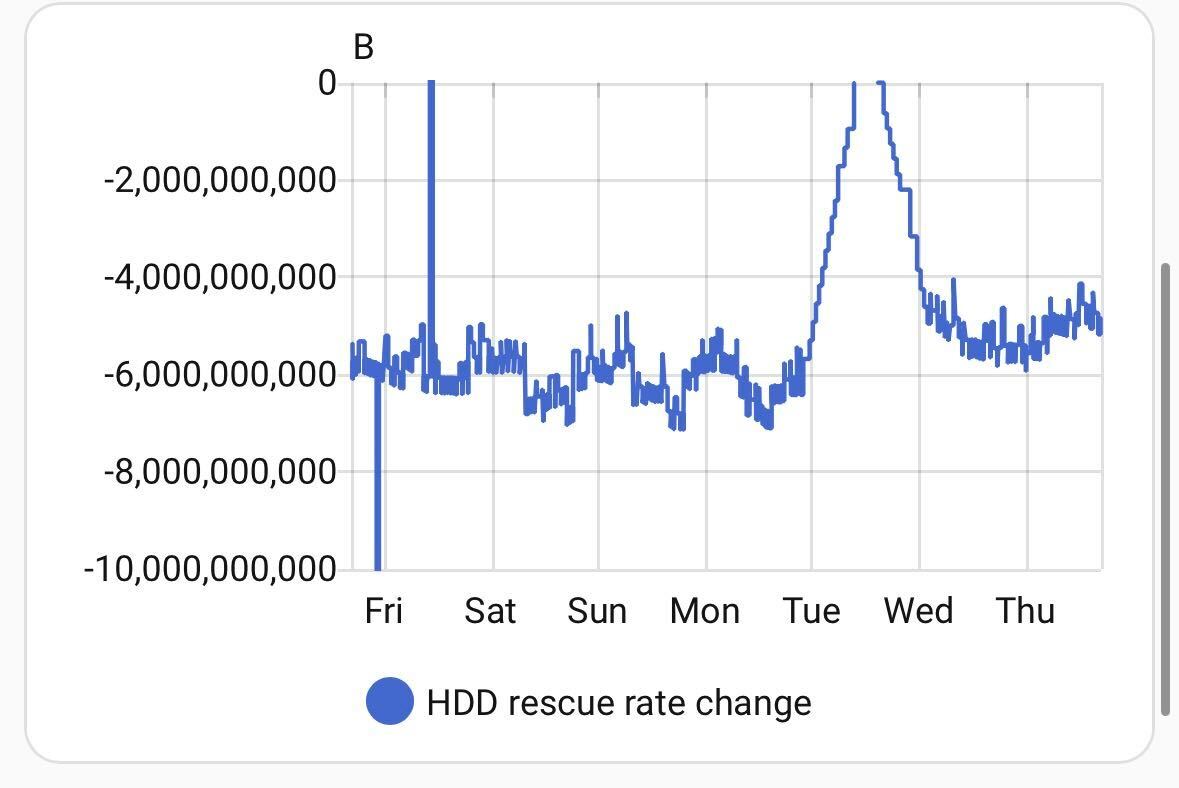
I prompted Claude Code to write a hfsplus_priority.py script to generate 16,000 arbitrarily-sized ddrescue commands for all the remaining blocks, and also publish this to MQTT.  The generated bash script would run for days; the MQTT publish I ran hourly to make me my pretty graph.  This was fun – I could post to the F3 Slack on occasion for people to cheer for the little hard disk that could:

This took another week or so.  At which point my graph levelled out at 40G to go.  Only a few segments in the ~16,000 had failed to read and weighed mere megabytes each – what did I miss?  The ddrecover master process said it was complete!

Trust, but Verify: The day Claude admitted to “helpfully” skipping blocks under 1MB

I teach classes on Claude Code.  I teach people to find ways to verify what it comes up with.  I’m well beyond Spicy Autocomplete; I’m often the FSD driver asleep at the wheel except instead of sleeping, I am parenting.  I should have expected this. In the hfsplus_priority.py script, Claude Code helpfully added a --min-size flag which defaulted to skipping blocks smaller than 1MB.  Claude’s context at this point in the project was huge, and full of references to iteratively trying to recover the largest ranges of data I could assuming that the disk would eventually crash.  It didn’t take long to find the problem (I asked Claude!) and I was on my way. This last recovery sweep added another few days and thousands more segments to cover, most of which were tiny, but added up to 40GB.

Almost there…

The “bytes to recover” graph in Home Assistant marched on to nearly zero.  A few megabytes were truly unreadable no matter how many times I tried, and every time I tried the disk needed a power cycle.  I was done.  I’d recovered all I needed to.

Integrity audit & reporting

I did the same dm-snapshot CoW setup, this time for the primary recovery disk.  Browsing around the volume was like living in a dream: it all worked!  But did it?  There are 600,000 files on the volume.  Let’s be systematic.

I prompted Claude Code to work up an auditor script which attempted to open every file and see if its file type and detected mime type (using the file command mime-info magic database) matched, and then I extended it to actually attempt to open every single file that it could using a Python library to see if the input data was sensible.  Reality hit: loads of files were unreadable, about 1/6 of the total count of files.  A bit of heuristic analysis showed that most of the unreadable files were auto-generated iPhoto thumbnails.

That said: a darn good result given that the data owner had already written it all off.

I took counts of file types, broken down by recovered vs lost, and had Claude Code write a little user-friendly report summary.  I packaged the 800G of data (now some of it gibberish, left in-place) and copied it to the user’s new scratch disk, a solid-state disk, which he said was bound for iCloud.  A good move for important data!  (I have since confirmed the data has made it to iCloud! Long live the data!)

Fin. Done.  I shut down the recovery computer.  Uptime: 59 days elapsed from start to finish.

Lessons from an Impossible Project

“No problem can withstand the assault of sustained thinking.” – Voltaire
“Nothing is impossible, except skiing through a revolving door.” – Woody Allen

the “rig” with the hard drive under examination in the upper-right on a piece of wood

A bit of AI and experience sure helps.

This is one of the joys of being self-employed: the idea that my effort, my drive, is all mine.  I volunteered for a seemingly impossible job, one which I would not normally pick up.  I said yes, expecting to lose and get nothing in return. When the going got tough, I still said “what else” and used a lot of tools.  AI was helpful, not just for technical coding, but also as a consult.  How many platters does this hard drive have?  Why is it pulling data so slowly?  Why is it timing out from the SATA bus?  How do I power cycle a disk on Linux?  Is there anything  I can do about the speed?  Can I tell the firmware to stop retrying so hard?  What’s the syntax for smartctl?  I can’t count on two hands the number of disparate chat threads I’ve made across Claude and ChatGPT and Gemini about this.  I’ve made so many on Claude that it now has a memory of the model of disk, and every now and again guesses that I’m talking about this disk when I ask an unrelated linux block device question!

Next World Backup Day, I’ve got a story to tell.

Posted in Uncategorized | Comments Off on The Impossible Job: Recovering a failing HFS+ external disk

Chasing AI – Claude Code as a Sysadmin

Others have said it already – Claude Code is great at a lot more than just code.  It’s great at using your computer.  Everyone needs a sysadmin from time to time, right?  I’ve used it for all sorts of bizarre things and wanted to share some of my stories to give others ideas beyond just coding.

Toshiba Flashair SD-Card configuration

I have this nifty little SD card for cameras which broadcasts a WiFi signal and lets you download photos remotely. It works while you’re taking pictures – handy for my old Canon Rebel T5i from the olden days of DSLRs. Toshiba stopped supporting their smartphone app so I stopped using it, but I wanted to revive it after years of disuse. Upon inspection I found that the card wasn’t broadcasting its AP. It uses a text file onboard which configures the firmware for what SSID to use and more; maybe I left this thing in a bad configuration? There are many online references for the config options and many permutations to try.

One of the biggest lessons I’ve learned using Claude Code is that you need to give it a way to validate its results – in code this is usually done with tests. Can we get it to iterate on this problem? Absolutely! In Linux, you can scan for WiFi networks at the CLI and just grep for it.

Claude tried a few permutations before it got it. The only thing I had to do to help it iterate once I gave it the right privileges was unplug and plug the card back in after each config change and watch Claude try stuff.

Check out the transcript. This was a fun one!

Docker Compose fun

I run a small (ish) stack of containers on a home server – things like Home Assistant, the fabulous solaredge2mqtt, my beautiful Metra Timetable, and a lot of experiments and hacks that I play with. I was running the old CLI docker-compose which has been deprecated for some time. The day finally came when something really broke: the underlying Python library dropped support for the http+docker URL scheme that old docker-compose was using.  Its day finally came after an apt update as docker-compose was throwing an exception every time I ran it.

I thought this would be a good experiment to ask Claude Code about; it’s great at bizarre error messages and can also digest the specifics of my setup when suggesting solutions. The long and the short of it was switching to docker compose like everyone else probably did years ago. Check out the transcript here.

Simple challenge: why is this package installed?

I happened to notice during an apt update some familiar packages from Ceph – but why does my laptop have Ceph packages installed?!

Normally I’d roll my eyes at the increasing complexity of modern Linux distributions, but I figured I’d toss the question to Claude Code since it can inspect my system. Sure enough, it’s because I am hacky enough to have libvirt/QEMU installed on my system.

See how Claude Code not only figures it out, but also comes up with a helpful, human-readable explanation.

Forensic analysis of a user’s Windows user profile

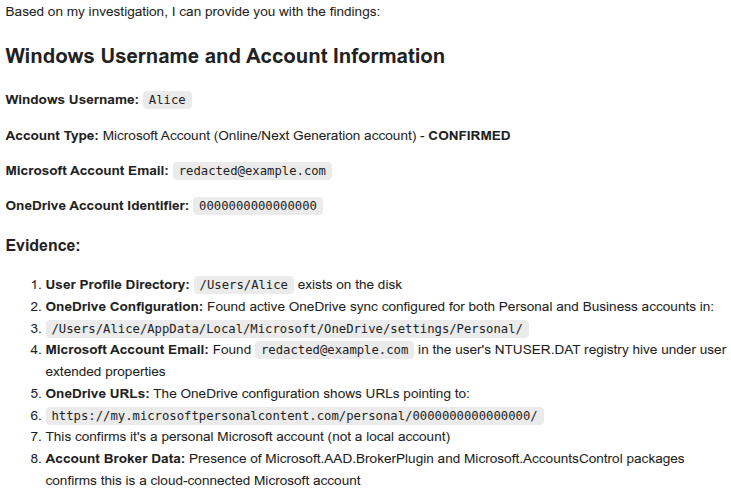
I’ve been helping some family with a tech challenge: a senior whose Windows 11 laptop crashed, never to boot again, but the Users directory was intact.  We need to recover data they might not even remember exists, and in particular, figure out their Microsoft Online / OneDrive account username.  Simple, right?

I spent too much time back and forth with AI chat bots trying to identify the user’s Microsoft Online account ID which was embedded somewhere in the registry and/or text files – but nothing they suggested yielded a result.  I’d all but given up, but finally threw the entire Users directory at Claude Code and said “figure it out.”

The beautiful thing about an agent is that it can try the dozens of permutations of places to look, really quickly, to find that proverbial needle.  I expected it to produce a negative result.  Sure enough, ~15 minutes of supervising the agent’s trawling of the hard drive and it yielded the simple,  definitive result.  I about fell off my chair.

Transcript if you’re curious.

TL;DR

Claude Code’s capabilities beyond code are generally underestimated – it is clearly capable of work well beyond the realm of coding.  See what you can get it to do!

📧 Chasing AI: Get notified of new posts

Enter your email to be notified when I publish something new:


I’ll only email you about new blog posts. No spam.
Posted in Uncategorized | Tagged | Comments Off on Chasing AI – Claude Code as a Sysadmin

Chasing AI: Check engine light diagnostics and AI? Really?

Years ago I bought one of these little OBD-II wireless diagnostic plugs because I wanted to datalog my car…a hobby project which naturally, like so many of my hobbies, I never finished.  The plug has sat in the console of the car, waiting for a day when I needed it.  Today was that day.  The check engine light came on during a road trip.  I haven’t driven a car with a check engine light since I was a kid!

Home late at night, over-caffeinated from the drive, I flashed back to what I’d learned while driving: my plug uses Bluetooth Serial Port Profile (SPP) which doesn’t work with iOS, so I can only use it with Android or Linux.  I figured I’d pull out pyOBD which I’d used years ago for my datalogging project as it had some level of GUI, and Claude was confident that it’d get me the diagnostic trouble code that my car wished it could tell me.

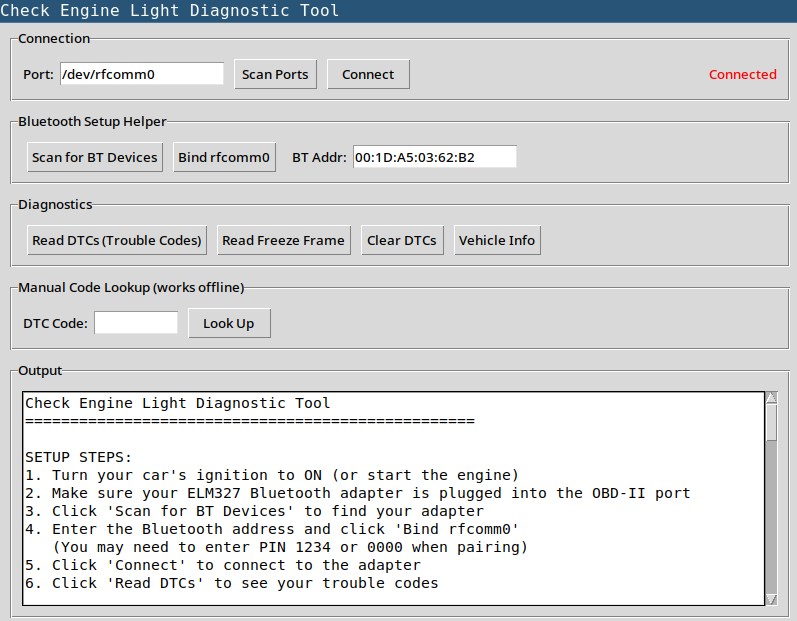
I’ve been using AI coding tools so much I decided to roll up my sleeves and get my hands messy.  I spent 20 minutes in Python dependency hell all to realize that pyOBD requires Pythons from a more civilized age.  I threw my hands up, and wrote a desperate prompt to Claude Code, my own little “Help me Obi Wan Kenobi, you’re my only hope” type prompt that you write when you’re tired.  It didn’t bother with pyOBD; it went to python-obd, and just drafted its own little app.  I wasn’t looking forward to Bluetooth pairing on Linux and the rfcomm binding dance, but it did some of that work for me.

It’s nothing to write home about, but it’s functional! I had to try it right away.  Laptop in the car, ignition on, I dealt with the bluetooth pairing and result:

FOUND 1 TROUBLE CODE(S):
============================================================

CODE: P0128
OBD Description: Coolant Thermostat (Coolant Temperature Below Thermostat Regulating Temperature)

I then excitedly pasted the transcript from the application back into Claude Code, which asked me for the make/model of the car, and went on to suggest that I may need a new coolant thermostat (a common problem) and to also check that I’m not low on coolant.  It offered to research videos on how to replace, estimated time to repair for someone handy, and estimated shop costs for the job – all the things you’d expect an AI assistant to do.

Makes me wonder – is there a market for a Check Engine AI Assistant App?  Buy a plug, skip the stressful “free” trip to the auto shop, get a diagnostic code and an AI recommendation on next steps?

I had this dusty $20 plug in my console for years and AI made it useful in 20 minutes.

📧 Chasing AI: Get notified of new posts

Enter your email to be notified when I publish something new:


I’ll only email you about new blog posts. No spam.

Posted in Uncategorized | Tagged | Comments Off on Chasing AI: Check engine light diagnostics and AI? Really?

hey.com email, a nice experiment, but I’m back to Google Workspace

A couple of years back I got fed up with email (as I perpetually do in waves throughout my life) and decided to try something other than Google Workspace / paid GMail. 37signals had just released hey.com for domains so I could bring my trick@vanstaveren.us email name over there, so I gave it a go.

At first I was stoked!  In fact I was, for about the first year.  Main advantages:

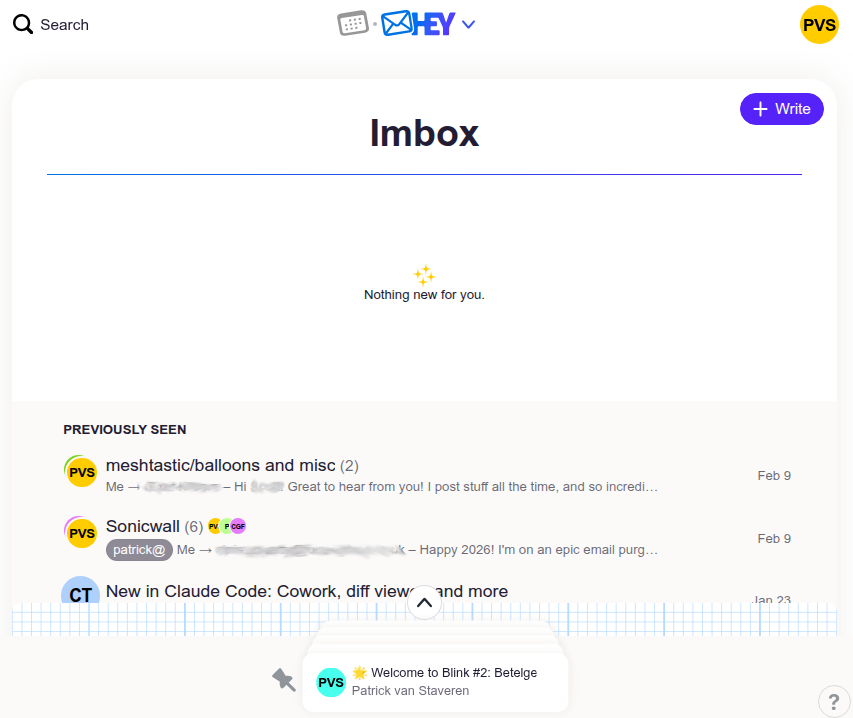
  1. New senders didn’t make it to your inbox; they made it to basically a quarantine box for new senders which you had to whitelist.  This is great!  At first.  Something hitting your inbox is a momentous occasion – a real person with something you want to read!
  2. Automatic filing boxes for “The Feed” (newsletter-type things that are optional to read) and “Paper Trail” (receipts, etc).  These are great.  Probably about 80% of email by count is one of these two; and having these as baked-in concepts keeps email simple.
  3. It’s on my domain!
  4. It’s different!

The not so nice:

  1. Offline never really worked.  I don’t use it much, but I learned that if I wanted to use it offline, it wasn’t worth trying.
  2. Spam filtering is there but isn’t great.  1/3 of new senders were spam.  While you can filter them out as spam, I found myself skimming a lot of spam to realize I was about to hit the “junk it” button.
  3. Plus addresses don’t work as you’d expect; if I want trick+blah@vanstaveren.us in my inbox, I have to go add it as an alias.  Most of these ended up in the Catch All box, which I never looked at, because it’s full of junk.
  4. The calendar.  There’s nothing wrong with taking a stab at your own calendar app, but manually copy/pasting Google Meet links from my free @gmail.com account into hey calendar made me crazy.  The calendar also was not sharable with my spouse nor my DakBoard display screen in my kitchen, nor any general view on my mobile phone, so events in there lived and died in there.  I kinda liked hey.com more without the calendar, because I would just forward invitations to my free @gmail.com account and deal with the confusion from there.
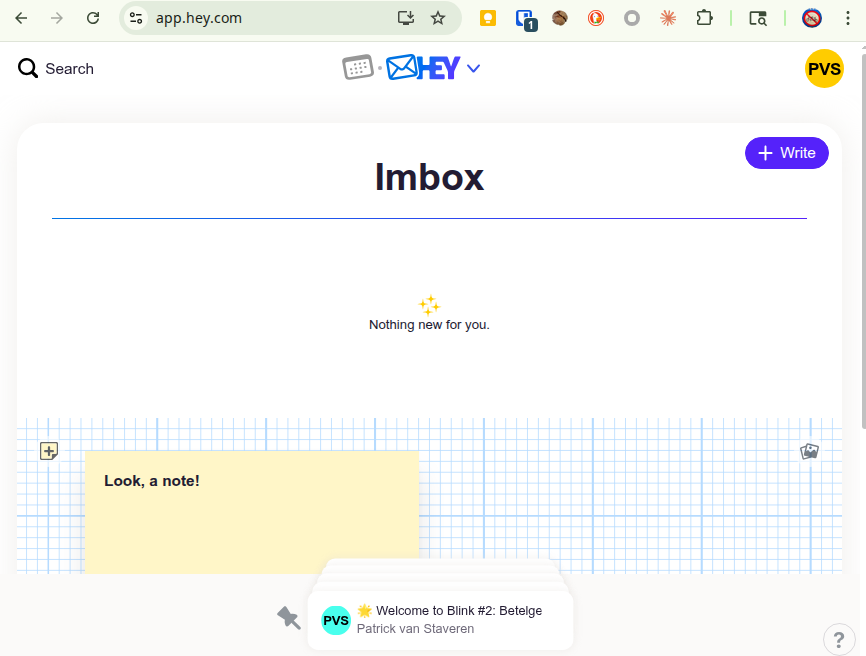
  5. What is this notes cover thing for? To stop me from getting distracted by all the email I’ve read, I guess?  I literally wrote “ahoy” on a note on day 1 and never used it and was only ever annoyed to find the feature was still there and I’d accidentally clicked on it.


My inbox never actually looked this clean.

What really drove me away:

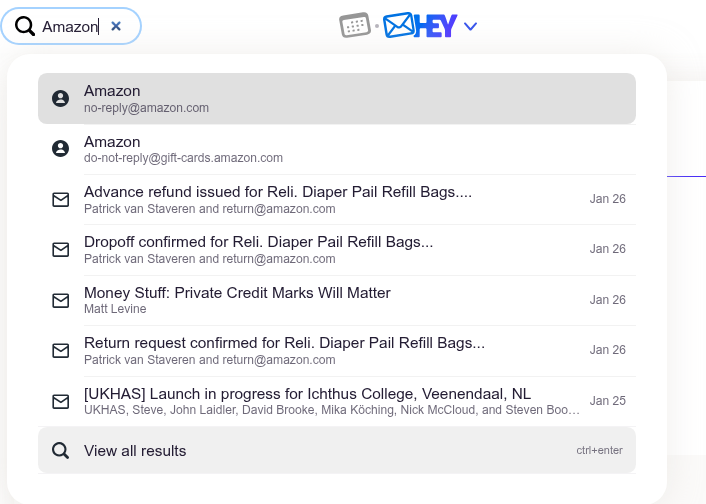
  1. The search.  Keyword searching was awful because I get a lot of newsletters that go into The Feed and are full of every word ever.  Don’t search for “QuickBooks” if you expect to find that email from a real human last week about QuickBooks because Money Stuff mentioned Intuit and QuickBooks half a dozen times in the last week, and that real human email is a page down or more.  Mistakenly hit enter on the quick search pullout?  You’re now reading the first, and wrong, email – not looking at a longer list of search results.  Best bet? Search for the person who sent you the email and scan through it.  This is faster.
  2. The iOS app supports notifications, but no red dot / bubble to show me an unread count.  I’ve come to rely on this in my move to iOS.  If I have something unread, it needs to show a red bubble.  The app does not.  (Why?!)
  3. Don’t try to reclassify a sender to go to The Feed if they start sending you junk – you’ll get lost in the maze of settings for what a sender is classified as.  Did you know you can also classify an entire domain name?  Of course you can!  But you’ll forever confuse yourself with layers of settings for where stuff should land.  It’s not intuitive.  The end result? Often when junk landed in my inbox, I started to feel it was faster just to mark it as read and forget about the seconds I just lost, rather than losing minutes to figure out how to reclassify something.  I knew I was going to move away from this email so I lost faith in the system that was supposed to save me time.
  4. Mailing list classification does not exist.  I’m on a few Google Group-type mailing lists and writing a filter for these in any modern email client is a sinch; hey.com does not support them.  You have to Yes/No the individual people you want to hear from.  You can’t send them all to The Feed where they probably belong.

The end result?  Email is annoying – it has been annoying for decades, but after a year on hey.com, it became annoying again.  I just couldn’t get over some of this stuff.  It took me another year to convince myself to migrate away.

This month I’ve done it – exported all my data, gone and re-started my Google Workspace subscription, and I’m finishing up the import now.  My inbox has never been cleaner (it helps that OpenClaw is monitoring my inbox for me daily and suggesting junk filters I should add!)

</hey.com>

Thanks for all the fish.

Posted in Uncategorized | Tagged , , , | Comments Off on hey.com email, a nice experiment, but I’m back to Google Workspace

Home Assistant integration: Claude Usage

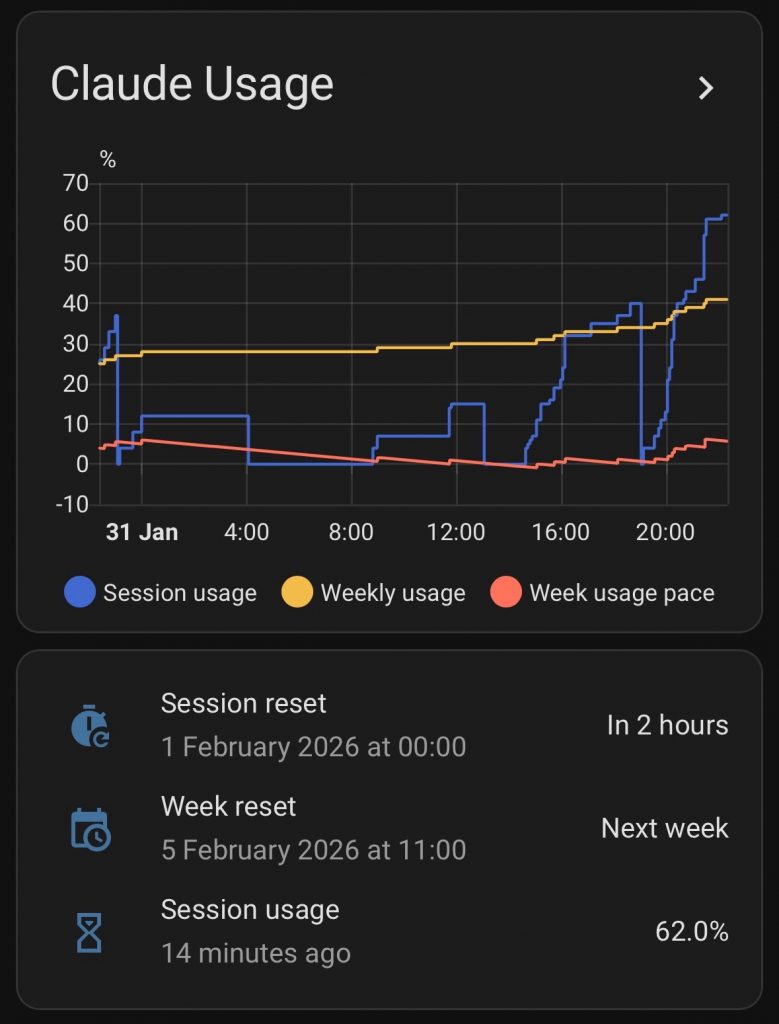
If you’re like me and constantly running up your Claude subscription usage to its limits, you want a graph. Anthropic has two rate limit windows; one which is five hours long and one which is a week. Go beyond either and you need to put in a credit card for extra usage, upgrade to Max, or – wait! What kind of AI charged engineer wants to wait?

I do more than half of my usage on my mobile phone, so I wanted the best and easiest graph platform a mobile user can get: Home Assistant.

Check out the open sourced code: https://github.com/trickv/hass-claude-usage

Installation with HACS is easy:

    1. Add the repository as a custom repository in HACS
    2. Restart Home Assistant
    3. Install “Claude Usage”
    4. Restart Home Assistant
    5. Go to Settings → Devices & Services → Add Integration → “Claude Usage”

Once it starts collecting data, make a History Graph with the data points and the window you find this useful for; I usually look at the 24 hour window. See the README for an example dashboard.

Let me know if you find this useful or are managing your usage in other ways?

How I built it – iteratively

Building this little tool was certainly different to how I would have approached this in the pre-AI past.  I would have defined not just the end goal but also the methods clearly and worked straight towards it, optimizing to spend as little time coding as possible.  Given that this is a hobby project, I probably never would have finished it!  The API was elusive at first and I couldn’t find examples for how to use it.  But the AI-enabled engineer approach lends us to an iterative approach, where code is cheap, and making something that works is important to justify spending more time on.  My iterations looked something like this:

  1. First version which used the HA API to create sensors, and used Claude Code CLI in a tmux session to get usage data. It would run Claude Code, wait a few seconds, type /usage, and grep the output.  It worked, albeit running claude code periodically contributed to usage!  But it gave me a graph, and it was useful.
  2. Refactored to run Claude Code and keep it open in a persistent tmux
    1. Somewhere in here I learned about Anthropic’s rate limits on the usage endpoints which block you for 24 hours when you hit them too much!
  3. Learned how to use the APIs directly to fetch usage status, but this approach had to steal Claude Code’s session token (which expires every few hours).
  4. Moved from HA API to MQTT integration to get better data into Home Assistant. This was a surprisingly easy refactor for Sonnet 4.5!
  5. Refactored to standalone OAuth (first time I used Opus 4.5 on this code)
  6. Now refactored into this Home Assistant custom integration, installable by HACS

How are you managing usage?

I’m curious to hear how others on low usage plans like mine (Pro) are managing their usage.  Let me know if  you find this useful!

Posted in Uncategorized | Comments Off on Home Assistant integration: Claude Usage

Chasing AI: Vibe coding a New Years Resolution tracker app

I follow the AI Daily Brief podcast and decided to take on their New Year’s challenge to complete an AI challenge/exercise each week as a way to learn different AI tools. For week one, “build a new years resolution tracker”, I went to my good friend Claude Code, but got ambitious – to code an iOS app.

Prior Work

I’ve been working on a few apps in the past year:

  • Porting rdzSonde, a radiosonde on-the-go tracking app which talks to hardware, from Android to iOS
  • A baby monitor app (coming – soon!)
  • Now this!

Having done a bit of Android development over the years and being more of a Linux head, I’ve found the iOS learning curve to be a challenge, but I’m finally getting to grips with it. So while this is the second app I’ve side loaded to my iPhone, it’s a decent size jump for me.

Approach

My initial goal was to prompt Claude Code to take some of what I’ve spent tokens on before (a GitHub Actions workflow which builds an unsigned IPA package file, and a corresponding AltStore repository definition json to make it convenient for me to sideload and test).  Get a “hello world” app working end to end, and then start building features.  It went well!  I wrote the original prompt for project framework on my laptop during a brief bit of free time between wrangling kids; almost all of the rest of this project continued with Claude Code in a SSH/Mosh session on my phone, nibbling away at it when I had time.

Step 1 – Initial Prompt

Here’s my initial prompt to build an iOS app, to use my baby monitor project Actions as examples, to build no features other than a hello world, and to produce an AltStore source json as a GitHub artifact.

This worked pretty well.  This was my first time building specifications for AltStore so this required some trial and error which is not surprising.  I steered the agent a bit with a decision to use React Native and played some back and forth with errors coming from AltStore.  It’s fun to be able to push a git tag, wait for it to build, and refresh AltStore, walk by my Mac and lift the lid (so the signing AltServer is awake) and install the latest version.

It worked!

Interesting stuff I learned along the way:

  1. Keep hitting Esc whenever you have something to say.  Don’t just queue your message and wait for the agent to finish what it’s doing; this is Claude Code – it might work for minutes only for you to redirect what it just did.  If you hit Esc on accident, just say “continue”, it’ll happily move on.
  2. Tailing build logs with Opus 4.5 on repeatedly failing builds with the Pro $20/month subscription is a great way to waste most of your tokens.  Switch to Haiku (hit Esc and interrupt!) or better yet, ask the agent to build a quick script which tails the logs, waits for completion, and only returns when there’s something interesting to show.
  3. You can, in fact, never open a Mac to build apps for a Mac!  This is not entirely true; I did have to lift the lid 30° to awake it so AltServer would run, but I never opened Xcode once.

Step 2 – the features prompt

I’m not kidding when I say I did this part from my phone, over SSH, with no autocorrect:

1) title and deacription; target date(s) for milestones if applicable…a resolution might have a single milestone. a simple checklist for each milestone and if all are conplete, confetti animation and the resolution gets crissed off. (2) progress: a journal entry log format. no expectation about how often; no promptijg the user, i may never use it. a single line question below the Resolution where you enter “Whats Next?” to ebcourage baby step thinking. user journey – list view of all resolutions, basic indicatioj of done/not done/ some milestones done, tap the resolution for details, show all milestones, recent journal entries, and the ability to edit. yes separate screen for creating a new resolution. (4) data – local. i dint know what AsyncStorage is but if thats your go-to its fine by me. use a data format that lets me make wild changes and keep some amount of data preserved as ling as the features for them are preserved. (5) screens: home screen eith list, resolution detail page which shiws Whats Next, list of milestones with checkboxes by them, and then journal entries for each; finally a resolution Edit page which shows a lot of the same stuff as in view mode but its all editable. vision; i expect to use this myself and for no one else, and jusr dir 2026. borrow some theme from my 42 project since im 42 this year (/home/trick/src/github.com/trickv/42) give it a HHGTG-inspired icon, maybe a pixelated bowl of petunias.

The actual transcript is here, but this is my one-shot explanation of features.

I’ve been using SSH from mobile devices for years and miss the days of my HTC Dream with it’s slide-out keyboard for accurate text input on SSH, but LLMs are incredible at understanding my typos so much that you can see I don’t bother to correct all kinds of ridiculous typos.

This yielded an…interesting result:

I got distracted working on the launcher icon and didn’t notice me running up against the five-hour session limit which I hit right as I was figuring out how to get a screenshot copied onto my dev host to show Claude Code.  It’s terrible at handling the session limit; since it was half way through a task list, it spammed pages upon pages of /rate-limit-options before I hit Esc and went to bed.

Step 3 – the fix

The model was quick to find the issue, which was a font size issue, and et voila!

I also went over to Nano Banana Pro and followed on my HHGTG theme and came up with a bowl of petunias icon for the launcher:

Result

Check out the live demo:

I should be blown away – but actually, this all makes sense to me.  It’s exciting, but it’s not surprising.  Based on my experience in the past half year, that I can expect Claude Code to be this good.  The only question is – what on earth to do with this capability?

Bugs I’ve Found

  • The giant “D” font thing.  Fixed.
  • The “What’s Next” text input box had a bug where it was storing input immediately and causing the UI to glitch when I typed too fast.  Fixed.
  • There was no scrolling when the keyboard popped up.  Easy enough to explain.  Fixed.

What’s Next

This gives me more fuel on the fire to run with other mobile app development ideas.  While this app isn’t a product worth much itself, the experience, and the open-sourced examples here are great for the next idea.  Much like I borrowed from the Baby Monitor project repository for Github Actions configurations, I can now borrow from this project (which I did earlier today on rdzSonde – I borrowed a feature from this app!

Something Interesting

Writing down my New Years Resolutions in this app has made me think and set some personal goals for myself that I otherwise would not have.  If nothing else, this little experience has helped me focus on some self improvement.

Got questions?  Reach out – I love talking about this stuff.  I work part-time as a freelance contractor and dad of three which means I love talking to adults.

Until next time – may your models be grounded, and your prompts be precise!

📧 Chasing AI: Get notified of new posts

Enter your email to be notified when I publish something new:


I’ll only email you about new blog posts. No spam.

Posted in Uncategorized | Tagged | Comments Off on Chasing AI: Vibe coding a New Years Resolution tracker app