A few years ago when first travelling overseas I spent $10 on a SIP-to-landline calling service, Diamondcard, that would allow me to use Ekiga on my laptop to make phone calls while in the UK to the US. It works well, and it’s cheap.
Nowadays I have a T-Mobile G1. Using Sipdroid and any available data connection, I can now make calls on Diamondcard from my phone.
How to:
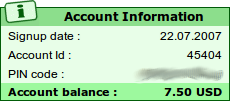
- Buy a Diamondcard account. Yes, click the giant red SIGNUP NOW link. Put ten bucks into it. You’ll end up with two distinct pieces of authentication:
- Website login username & password: these aren’t used to connect to the SIP server.
- Account ID (mine’s five digits) and PIN number (mine’s 12 digits). These are for SIP authentication.
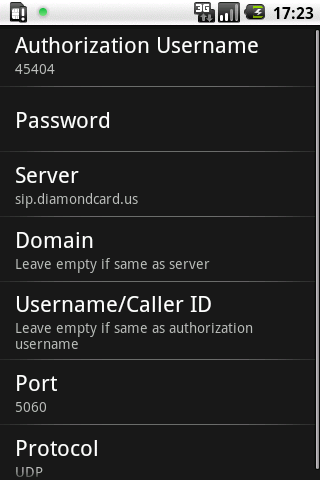
- Download and install Sipdroid. I recommend grabbing the version off the site as it supports connections over 3G, which is not available in the market edition.
- In Sipdroid go to Menu -> Settings -> SIP Account Settings
- Make a test call. Dial *43 for the standard Asterisk echo test. Sipdroid shows latency and loss stats on screen, watch them. I recommend staying on the echo test for a few minutes to see how stable your connection is.
- Call people! I’m pretty sure you’ll need to be explicit about country codes so be sure to prefix numbers appropriately, such as +1 800-555-0123 or +44 20 7946 0123.
You might also want to:
- Plug Diamondcard into PBXes.org (it does work, maybe I’ll write it up…)
- Set your Diamondcard Caller ID
I owe you a case of Molson for this one!
The only problem I had was that Diamondcard lock your account until either you call them or they call you. So if you’re doing this and signing up for the first time it’s probably worth getting set up before you leave rather than having to make an expensive roaming call in order to make cheap ones (as I ended up doing).
The above instructions worked first time (which is extremely rare in this sip world!). I have a green light, but when I dial *43 the call instantly ends. I know my diamondcard account is ok because the light is green and I’ve used from my ekiga desktop client.
Thoughts?
I wish there was a logfile or something to read….
wcn